AI-Powered Appointment Management: A Business Leader's Guide
AI-Powered Appointment Management: A Business Leader’s Guide

AI-powered appointment management is an autonomous scheduling system that uses natural language processing (NLP), real-time calendar intelligence, and machine learning to book, route, and optimize appointments with minimal human intervention. For business leaders, the bottom line is straightforward: it replaces phone tag and manual confirmations with a system that interprets booking intent, resolves conflicts automatically, and connects every appointment to downstream workflows like CRM updates, payments, and reminders.
The practical impact shows up fast. Fewer no-shows. Less staff time lost to administrative work. And a scheduling layer that actively surfaces rebooking opportunities instead of waiting for clients to call back.
Core capabilities at a glance:
- Conversational booking via chat, voice, or text (24/7, no staff required)
- Real-time availability checks against live calendar data
- Intelligent routing to the right provider, room, or resource
- Behavioral reminders that adapt timing and channel to reduce no-shows
- Automated intake forms, deposits, and payment collection
- CRM integration that turns a booked appointment into a retention trigger
Pro Tip: Before evaluating any vendor, ask one question first: does your scheduling engine perform its own combinatorial optimization, or does it rely entirely on a large language model for decision logic? The answer tells you more about reliability than any feature list.
Table of Contents
- What is AI-powered appointment management, and how does it differ from basic scheduling?
- How does AI appointment management work technically?
- What core features should you expect from these systems?
- What measurable business benefits does AI scheduling deliver?
- Which industries benefit most from AI scheduling?
- What does implementation actually look like?
- How should you evaluate vendors?
- Real-world outcomes and ROI signals
- Common challenges and limitations
- Security and privacy beyond compliance
- Best practices for adoption and change management
- Key Takeaways
- The case for staged, ownership-first implementation
- Arosplatforms helps you build AI scheduling you actually own
- Useful sources
- FAQ
What is AI-powered appointment management, and how does it differ from basic scheduling?
Basic scheduling software gives you a calendar grid and a set of manual rules. A client picks a time, the system checks whether that slot is marked available, and it confirms. That is rule-based automation. It does not learn, adapt, or recover gracefully when something breaks the rules.
AI-powered scheduling is architecturally different. The system interprets context, learns preferences over time, and makes autonomous decisions that previously required a human judgment call.
What AI scheduling does that basic tools cannot:
- Understands natural-language requests (“Can we meet Thursday afternoon, somewhere after 2?”)
- Proactively reschedules when a conflict arises, rather than flagging it for staff to resolve
- Learns individual and team preferences to suggest better times over repeated interactions
- Predicts no-show risk based on past behavior and adjusts reminder cadence accordingly
- Converts a cancellation into an automatic waitlist fill without anyone lifting a finger
A clinic using a basic online booking form still fields dozens of calls weekly — patients who want to reschedule, ask about availability, or confirm details. An AI scheduling system handles all of that conversationally, around the clock, without a front-desk staff member involved. The form fills slots. The AI manages the relationship.
The distinction matters for procurement: a booking widget is a feature. An AI scheduling system is an operational layer.
How does AI appointment management work technically?
The system runs on three layers working in sequence. First, an NLP layer interprets what the customer or patient is asking, whether typed, spoken, or messaged. Second, a proprietary scheduling engine performs the actual optimization math: checking live calendars, applying routing rules, resolving multi-person availability, and selecting the best slot. Third, an integrations layer pushes the confirmed appointment into calendars, CRMs, payment processors, and communication tools.
The data flow from request to booked appointment:
- Customer sends a request via chat, voice, SMS, or web widget
- NLP layer parses intent, service type, preferred time, and any constraints
- Scheduling engine queries live calendar APIs and applies routing logic
- Engine selects the optimal slot and checks for conflicts across all relevant resources
- System confirms the booking, sends a confirmation, and triggers downstream workflows (CRM update, intake form, deposit request)
- Reminder engine fires multi-touch follow-ups based on behavioral timing models
Real-time calendar API access, scalable SMS infrastructure, and workflow automation platforms are the three technical prerequisites that made this architecture viable at scale.
Pro Tip: LLMs are excellent at parsing intent but poor at the combinatorial logic required for multi-person routing. Clockwise describes this precisely: they feed intent data from LLMs into a proprietary scheduling engine where the math actually happens. That architecture is what separates reliable AI scheduling from a chatbot that sometimes books appointments.

What core features should you expect from these systems?
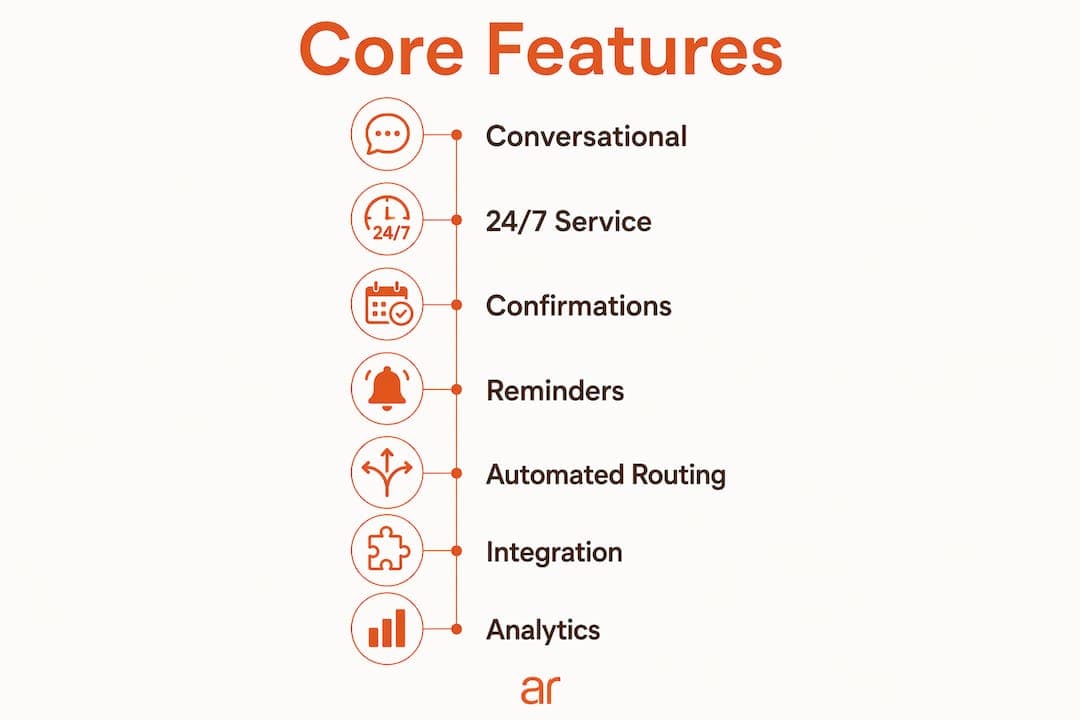
A well-built AI scheduling system functions as a managed operational layer, not a collection of loosely connected features. Every component should feed data back into the others.
Feature checklist:
- Conversational booking (chat, voice, text) with natural-language date handling
- Real-time availability across providers, rooms, and locations
- Intelligent routing based on service type, staff skills, and resource availability
- Adaptive intake forms that collect information before the visit
- Multi-touch behavioral reminders (email + SMS, timed to reduce no-shows)
- Deposit collection and no-show protection at booking
- CRM and video platform integrations
- Analytics dashboard with utilization, no-show rates, and booking velocity
| Category | Features |
|---|---|
| Client-facing | Conversational booking, 24/7 self-service, confirmations, reminders, rescheduling, intake forms, deposit/payment |
| Operations-facing | Intelligent routing, conflict resolution, waitlist auto-fill, staff/resource allocation, calendar sync |
| Analytics & integrations | No-show tracking, utilization reporting, CRM sync, video platform links, API access, audit logs |
What measurable business benefits does AI scheduling deliver?
The top-line benefits are lower no-show rates, faster booking velocity, freed staff hours, and higher slot utilization. Businesses adopting AI-integrated scheduling report operational improvements across all four, with the most consistent gains coming from automated reminders and waitlist auto-fill working together.
Automated reminders, easy self-rescheduling, and deposits taken at booking all reduce no-shows, and automated waitlists recover the slots that do open up. The effect is most reliable when reminders and follow-ups are connected to the patient record rather than run from a separate tool. — Pabau
Beyond no-shows, the CRM integration angle is where revenue retention compounds. AI scheduling converts CRM from a passive record into an active retention tool by surfacing rebooking opportunities and flagging at-risk clients based on booking behavior. A client who cancels and does not rebook within 14 days can trigger an automated outreach sequence. That is revenue that basic scheduling simply loses.
Which industries benefit most from AI scheduling?
Healthcare, automotive service, salons and spas, professional services, and field service operations see the strongest returns. The common thread is high booking volume, multi-resource coordination, or time-sensitive appointment windows where a no-show or routing error has a direct revenue cost.
Concrete use cases by industry:
- Healthcare and clinics: Automated patient scheduling with digital intake, consent forms, telehealth link delivery, and HIPAA-compliant reminders
- Automotive dealerships: Service-lane routing by technician skill and bay availability; CRM-connected follow-ups for recall and maintenance rebooking
- Salons and spas: Multi-staff booking, deposit collection, and behavioral reminder sequences that reduce last-minute cancellations
- Professional services (legal, financial, consulting): Qualification-gated booking flows that collect client context before the meeting
- Field service: Geographic routing combined with technician availability and parts inventory signals
AI scheduling becomes a strong fit when booking volume exceeds what a small admin team can handle without errors, when appointments involve multiple people or resources, or when time-zone complexity creates coordination overhead.
What does implementation actually look like?
A realistic rollout runs in three phases: a controlled pilot (weeks 1–6), phased expansion to additional locations or service lines (weeks 7–16), and ongoing optimization driven by analytics (month 5 onward). Most organizations see measurable no-show and utilization improvements within the pilot phase.
Integration checklist for procurement:
- Calendar systems: Google Calendar, Microsoft Outlook/Exchange, or both
- CRM platform: Salesforce, HubSpot, or your industry-specific system
- Payment processor: Stripe, Square, or existing gateway
- Video platform: Zoom, Microsoft Teams, or Google Meet for telehealth or virtual consultations
- Communication infrastructure: SMS gateway (Twilio or equivalent) for reminder delivery
- SSO and access management for staff authentication
- API access and integration tooling for connecting scheduling events to downstream workflows
Cost drivers to budget for:
- Volume-based pricing (bookings per month or active users)
- Premium routing and optimization features
- Custom integrations beyond standard connectors
- Ongoing configuration and analytics support
For healthcare deployments, HIPAA compliance is non-negotiable. Verify encryption in transit and at rest, data residency (US-based servers), Business Associate Agreement availability, and audit log access before signing any contract.
Pro Tip: Run the pilot on reminders and waitlist auto-fill first. These two features deliver measurable ROI within weeks and require the least integration work. Use that data to justify the full rollout budget.
How should you evaluate vendors?
Prioritize architecture, data ownership, and measurable outcomes over feature count. A vendor with a proprietary scheduling engine, open API access, and clear data portability terms is worth more than one with a longer feature list and opaque data practices.
Questions to ask in every vendor demo:
- How does your scheduling engine handle multi-person or multi-resource routing?
- Do we own our booking and behavioral data, and can we export it in full?
- What calendar and CRM APIs do you support natively?
- How do you measure and report no-show rate improvements?
- What does your SSO and audit log support look like?
- What is your uptime SLA and incident response process?
The right choice is the one that automates your booking, reminders, and waitlist without adding another disconnected tool to reconcile. — Pabau
Red flags to walk away from:
- No API access or integration roadmap
- Data locked in the vendor’s system with no export capability
- Scheduling logic that runs entirely through an LLM with no dedicated optimization engine
- Missing audit logs, SSO support, or HIPAA BAA for healthcare use cases
- Vague answers about how no-show improvements are actually measured
Real-world outcomes and ROI signals
The KPIs that matter most to executives are no-show rate reduction, booking velocity (time from first contact to confirmed appointment), staff hours recovered per week, and slot utilization rate.
| KPI | Typical improvement signal | Source basis |
|---|---|---|
| No-show rate | Reduction through automated reminders + deposits | Pabau, Acuity Scheduling |
| Staff hours recovered | Reduction in manual confirmation and phone-tag tasks | Agentzap, Schedly |
| Booking velocity | Faster self-service vs. phone-based booking | Interlinked AI, Schedly |
| Slot utilization | Waitlist auto-fill recovering canceled slots | Pabau |
[Proprietary client case studies and ROI figures available on request from Arosplatforms — see the customers page for published examples.]
AI scheduling shifts the front desk from reactive task execution to proactive time management: systems predict no-show risk, defend capacity, and rebalance resources to strategic priorities before problems surface.
Common challenges and limitations
The technology is not plug-and-play. Integration complexity is the most common implementation barrier: connecting scheduling to a legacy CRM or an older practice management system often requires custom API work. Data quality matters too. An AI system trained on sparse or inconsistent historical booking data will produce poor routing and reminder recommendations until it accumulates enough signal.
Staff adoption is a real friction point. Teams accustomed to manual confirmation workflows sometimes route around the system, which undermines the data quality the AI depends on. Change management is not optional. Vendor lock-in is another risk: some platforms make data export difficult, which limits your ability to switch or build on top of the system later.
Security and privacy beyond compliance
HIPAA and SOC 2 cover the compliance floor, but AI scheduling introduces risks that standard compliance frameworks do not fully address. The model that learns booking preferences is also building a behavioral profile of your clients. How that data is used for model training, whether it is shared across the vendor’s customer base, and how long it is retained are questions most procurement checklists miss.
Model bias is a subtler issue. If an AI routing engine was trained on historical booking data that reflects past staff availability patterns, it may systematically under-route certain appointment types or client segments. Audit your routing outcomes by service type and client segment after the first 90 days. Anomalies in utilization across providers are often the first sign of a bias problem.
Verify: end-to-end encryption, US-based data residency, clear model training data policies, and the right to delete client data on request.
Best practices for adoption and change management
Start narrow. Deploy reminders and self-rescheduling before touching routing or intake automation. This limits integration risk and gives staff time to trust the system before it takes on more decision authority.
Assign an internal owner, not just a vendor contact, for the first 90 days. That person monitors no-show rates, reviews routing outcomes, and escalates edge cases before they become habits. Communicate to staff what the system handles and what still requires human judgment. Ambiguity about the boundary is where adoption breaks down.
Measure weekly during the pilot. No-show rate, slot utilization, and staff time on manual confirmations are the three numbers that tell you whether the system is working. If any of them moves in the wrong direction, you want to know in week three, not month three.
Key Takeaways
AI scheduling is an operational copilot that compounds value over time when it is integrated with CRM, reminders, and payments from day one.
| Point | Details |
|---|---|
| Start with reminders and payments | These two features deliver measurable no-show reduction with minimal integration work. |
| Integrate CRM from the start | Scheduling data activates retention workflows only when it flows into your CRM in real time. |
| Verify data ownership and API access | Demand full data export rights and open API access before signing any vendor contract. |
| Pilot before full rollout | Run a controlled pilot and measure no-show rate, utilization, and staff hours before expanding. |
| Arosplatforms builds ownership-first systems | Arosplatforms embeds within your operations to build AI scheduling systems your team owns and can scale without vendor lock-in. |
The case for staged, ownership-first implementation
The conventional wisdom on AI scheduling adoption is to pick the most feature-rich platform and configure it to fit. That approach consistently underdelivers. The real failure mode is not choosing the wrong vendor. It is deploying a system your team does not understand, cannot audit, and cannot modify when the business changes.
What actually works: start with the two or three workflows that have the clearest ROI signal (reminders, waitlist fill, intake forms), instrument them properly, and build outward from measured wins. Every expansion should be justified by data from the previous phase, not by a vendor’s roadmap.
The governance question is equally underrated. Who owns the scheduling data? Who can modify routing rules? Who reviews the AI’s decisions when a client complains? These questions need answers before go-live, not after the first incident. Organizations that define data ownership and decision authority upfront spend far less time on remediation later.
Arosplatforms helps you build AI scheduling you actually own
Most AI scheduling deployments stall not because the technology fails, but because the system was never truly integrated into how the business runs. Arosplatforms takes a different approach: rather than configuring an off-the-shelf tool, the team embeds within your operations to build a customized AI scheduling system that connects to your CRM, your calendar infrastructure, and your downstream workflows from day one.

Clients typically see a noticeably faster turnaround on key scheduling and intake tasks, with measurable ROI within a year. There is no vendor lock-in: your team owns the system and can scale or modify it without going back to a vendor for every change.
Ready to scope a pilot? Start with a consultation to map your current scheduling friction, identify the highest-ROI automation targets, and define a 90-day pilot plan with clear KPIs.
Useful sources
For technical due diligence, start with the Schedly and Agentzap guides. For procurement and healthcare-specific implementation, the Pabau resource is the most practical. For architecture understanding, Clockwise’s explanation of LLM-plus-scheduling-engine design is the clearest available.
- AI-Powered Appointment Scheduling: The Complete Guide (Schedly) — architecture, features, and industry consensus
- AI Appointment Booking Guide for Service Businesses (Agentzap) — practitioner-level guidance on scheduling engines and CRM integration
- AI Patient Scheduling: How It Works (Pabau) — healthcare-specific implementation and compliance notes
- Clockwise AI Calendar — reference architecture for LLM-plus-scheduling-engine design
- How AI Booking Works (Interlinked AI) — conversational booking flow documentation
- Automate Patient Scheduling: AI System Guide for Clinics (Arosplatforms) — healthcare pilot checklist and implementation guidance
- AI Service Scheduling Benefits for Automotive Dealerships (Arosplatforms) — service-lane routing metrics and use cases
- AI Agents & Automation (Arosplatforms) — technical services for connecting scheduling to downstream automations
- AI Case Studies & Customer Stories (Arosplatforms) — published ROI examples and proprietary case study requests
FAQ
What is AI-powered appointment management?
It is an autonomous scheduling system that uses NLP, real-time calendar intelligence, and machine learning to book, route, confirm, and optimize appointments with minimal staff involvement, replacing manual phone-based processes.
How does AI scheduling reduce no-shows?
Behavioral reminder sequences sent via email and SMS, combined with deposit collection at booking and automatic waitlist fill when cancellations occur, consistently reduce no-show rates across healthcare, service, and professional services settings.
What integrations does an AI scheduling system need?
At minimum: a calendar API (Google or Outlook), a CRM, a payment processor, and an SMS gateway. Healthcare deployments also require a HIPAA-compliant data layer and a Business Associate Agreement with the vendor.
How long does implementation take?
A controlled pilot typically runs 6 weeks, covering reminders and self-booking. Full phased rollout to additional service lines or locations runs 16 weeks, with ongoing optimization beginning in month 5.
How can Arosplatforms help with AI scheduling adoption?
Arosplatforms builds ownership-first AI scheduling systems embedded directly into your operations, connecting scheduling to CRM, intake, and payment workflows, with a 90-day pilot structure and measurable KPIs from week one.