QuickBooks vs Xero: When 5+ Users Make Xero Cheaper for SMBs
QuickBooks vs Xero: When 5+ Users Make Xero Cheaper for SMBs
QuickBooks Online wins for U.S. product sellers who need native payroll, solid inventory tools, and an accountant who already knows the software. Xero wins for service businesses and growing teams that want unlimited users on every plan and a leaner mid-tier bill. The trade-off comes down to price versus built-in payroll and inventory depth. The scenarios and cost math below make the choice concrete.
TL;DR:
- QuickBooks’ native payroll and inventory tools can significantly reduce additional app costs for product sellers needing integrated solutions.
- Xero’s unlimited user plan and open API make it more cost-effective for growing teams with high user counts and diverse app integrations.
- The total cost of ownership may favor Xero once a team surpasses five users or needs basic inventory support without paying for extensive native features.
- Accurate feature testing during trial periods—including bank feed accuracy, payroll setup, and report customization—prevents costly migration mistakes.
- Automating manual bookkeeping processes with AI solutions can improve workflow efficiency more than switching platforms, regardless of the initial choice.
Table of Contents
- QuickBooks vs Xero: The Side-by-Side Comparison
- How Do QuickBooks and Xero Compare on Daily Bookkeeping Tasks?
- What Do QuickBooks and Xero Actually Cost in 2026?
- Which Platform Wins on Inventory, Payroll, and Integrations?
- How Do You Choose Between QuickBooks and Xero?
- When Does Automation Matter More Than the Platform You Pick?
- Our Take: Pick by Payroll and Inventory First
- Cut the Manual Work, Whichever Platform You Choose
- Sources
- FAQ
QuickBooks vs Xero: The Side-by-Side Comparison
Price alone doesn’t settle this. QuickBooks Online charges more per seat as you scale, but it bundles payroll and inventory tools that Xero leaves to add-ons. Xero flips that: cheaper access for more people, thinner native functionality on payroll and stock tracking. Here’s how the two stack up on the dimensions that actually change your monthly bill and your workflow.
| Dimension | QuickBooks Online | Xero |
|---|---|---|
| Typical all-in price | Generally higher at mid and upper tiers | Generally lower at mid tier, comparable at top |
| Users included | Tiered by plan (3 to 25) | Unlimited on every plan |
| Payroll | Native, built into the platform | Partner integration (commonly Gusto) |
| Inventory support | Strong native tools on Plus/Advanced | Basic native, relies on add-ons for depth |
| Reporting & analytics | Deeper customization on higher tiers | Solid standard reports, less granular |
| Integrations & app ecosystem | Large marketplace, strong accounting-specific apps | Large marketplace, open API, integration-first design |
| Ease of use | Familiar to most U.S. accountants | Praised for clean bank reconciliation |
| Support & accountant familiarity | Widest accountant familiarity in the U.S. | Growing familiarity, especially among cloud-native bookkeepers |
| Best for | Product sellers needing payroll + inventory in one tool | Teams wanting unlimited seats and integration flexibility |
QuickBooks Online best-for scenarios:
- Retailers or product sellers who need inventory tracking without buying a separate app.
- Businesses that want payroll, tax filing, and books in a single subscription.
- Teams whose CPA or bookkeeper already works in QuickBooks daily.
Xero best-for scenarios:
- Teams past 5 users where seat-based pricing on other platforms starts to sting.
- Businesses building a stack of connected apps around a single accounting core.
- Companies prioritizing fast bank reconciliation over deep native inventory.
On payroll, the split matters more than it looks on paper. QuickBooks payroll is built into the platform, so payroll runs and books update without a sync step. Xero pairs with Gusto, and that add-on typically runs an extra monthly base fee plus a per-employee charge, which changes the math once you have more than a couple of employees on the books.
How Do QuickBooks and Xero Compare on Daily Bookkeeping Tasks?
Software choice is really a bet on where you’ll lose or save time every week. Invoicing, reconciliation, and reporting are where that time gets spent, and the two platforms handle each differently enough to matter.
Invoicing and payment collection. Both let you send invoices, accept online payment, and set up recurring billing. QuickBooks leans on its own payment processing and gives you more customization on invoice templates at the Plus tier and above. Xero’s invoicing is simpler by design, which shortens onboarding for new staff but limits how far you can customize a client-facing invoice.
Bank feeds and reconciliation. This is where user reviews consistently favor Xero. Reviewers on G2’s comparison of small-business tools point to Xero’s reconciliation screen as faster to work through, largely because it groups similar transactions and suggests matches more aggressively. QuickBooks reconciliation works fine but takes more clicks per batch for businesses with high transaction volume.
Reporting and forecasting. PCMag’s testing found QuickBooks ahead on report customization and depth, especially on Plus and Advanced, where you can build management reports tailored to a specific department or class. Xero’s standard reports cover the basics well but offer less granular control without exporting to a spreadsheet or a connected analytics tool.
Automation that cuts manual entry. Both platforms auto-categorize transactions using rules and machine learning, and both improve with more historical data. Neither replaces a dedicated automation layer, though. If receipt matching, vendor bill entry, or multi-entity consolidation eats hours every month, that’s a sign you need automation on top of either platform, not a different platform.
Projects and job costing. QuickBooks Plus and Advanced include project tracking with labor cost and profitability views built in. Xero offers projects as an add-on module bundled into Established plans, with lighter job-costing detail than QuickBooks’ equivalent. Service firms billing by project should test this feature specifically during a trial, since it’s the one area where a shallow implementation causes the most reporting headaches later.
The pattern across all four areas: QuickBooks rewards businesses that want one deep tool, and Xero rewards businesses that want a fast, simple core connected to other apps.
What Do QuickBooks and Xero Actually Cost in 2026?
List prices tell only part of the story, since seat limits and payroll add-ons change the real bill fast. Here’s what each plan runs and what three common business types actually pay per month.
- QuickBooks Online plans. Simple Start, Essentials, Plus, and Advanced tiers scale from a single user up to 25, with price increases across most tiers noted heading into 2026. Native payroll is a separate add-on billed per company plus per employee.
- Xero plans. Ignite, Grow, and Comprehensive tiers all include unlimited users, with the Grow tier priced below QuickBooks’ comparable mid-tier. Payroll requires a Gusto connection with its own base fee and per-employee charge.
- Where forced upgrades happen. QuickBooks caps users per plan, so adding a fifth or sixth team member can force a jump to Advanced. Xero’s unlimited-user model avoids that trigger entirely, which is the single biggest cost lever for growing teams.
Pro Tip: Before you commit, add up your total expected users for the next 12 months, not just today’s headcount. A QuickBooks tier that looks cheaper now can force an expensive upgrade the moment you hire.
Three quick scenarios show how this plays out. A solo consultant with no payroll and no inventory pays close to the same on either platform’s entry tier, so the deciding factor becomes personal preference on invoicing style. A four-person service firm needing payroll starts to favor QuickBooks if payroll simplicity matters more than seat cost, but Xero plus Gusto can still land cheaper once you factor in Xero’s lower Grow-tier price. A five-person retail business selling physical product usually leans QuickBooks Plus, since native inventory and COGS tracking avoid paying for a separate inventory app on top of Xero’s base subscription.
Which Platform Wins on Inventory, Payroll, and Integrations?
Feature depth is where the two products genuinely diverge, and the right answer depends entirely on which category your business lives in.
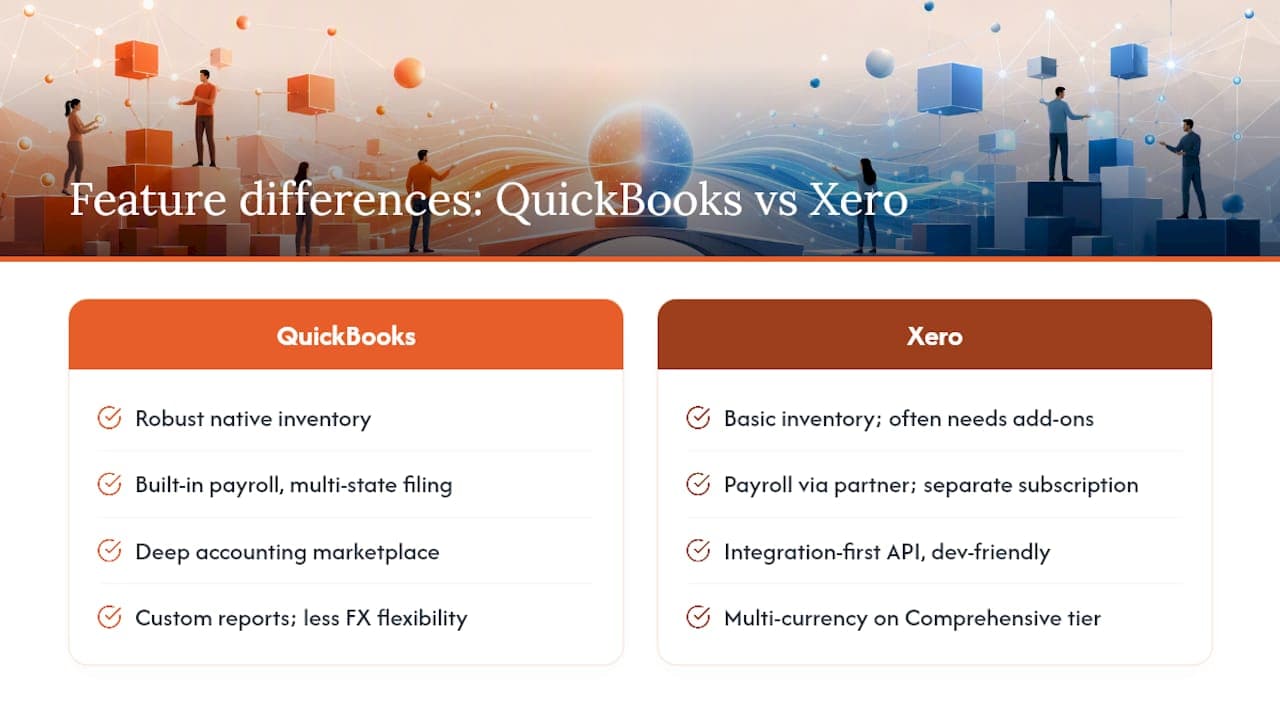
Inventory management. QuickBooks Plus and Advanced include robust native inventory tools out of the box. Xero’s native inventory supports basic tracking but lacks alerts, so heavier inventory users often require third-party add-ons. If you sell physical goods with meaningful stock turnover, QuickBooks’ built-in inventory tools reduce integration friction that Xero users have to solve separately.
Payroll and tax filing. QuickBooks payroll handles multi-state filing and automated tax payments inside the same login as your books. Xero’s payroll runs through a partner that requires separate subscription and syncing, which can affect workflow preferences.
Integrations and the app ecosystem. Both platforms connect to hundreds of third-party apps, but Xero’s positioning is more integration-first, with an open API that developers and automation partners favor when building custom connections. QuickBooks’ marketplace is deep on accounting-adjacent tools, and QuickBooks also connects well to CRM platforms, an area covered in more depth in this guide to QuickBooks CRM integration. If your roadmap includes connecting Stripe, Shopify, or a custom internal tool, check both platforms’ webhook support directly, since API stability matters as much as the number of listed integrations once you’re moving data automatically.
Reporting and multi-currency. QuickBooks Advanced supports custom report building with more granular filtering. Xero includes multi-currency accounting on its Comprehensive tier, which is useful if you invoice international clients regularly, while QuickBooks handles multi-currency but with less native flexibility on FX rate management.
Mobile apps. Both apps cover receipt capture, mileage tracking, and basic reconciliation on the go. QuickBooks’ mobile app mirrors more of the desktop feature set, while Xero’s mobile experience is lighter but faster to navigate for quick invoice checks between meetings.
How Do You Choose Between QuickBooks and Xero?
A short checklist settles most of these decisions faster than another week of demo calls.
- Do you sell physical inventory? If yes and reorder tracking matters, lean QuickBooks. If no, or your inventory needs are light, Xero’s simplicity works fine.
- Will you cross five or more users within a year? If yes, Xero’s unlimited-user model likely saves money at scale. If you’ll stay under five, the seat cap matters less.
- Does your bookkeeper or CPA already have a strong preference? Ask directly what file formats they need, which reports they pull monthly, and whether they’ve handled a migration between the two platforms before.
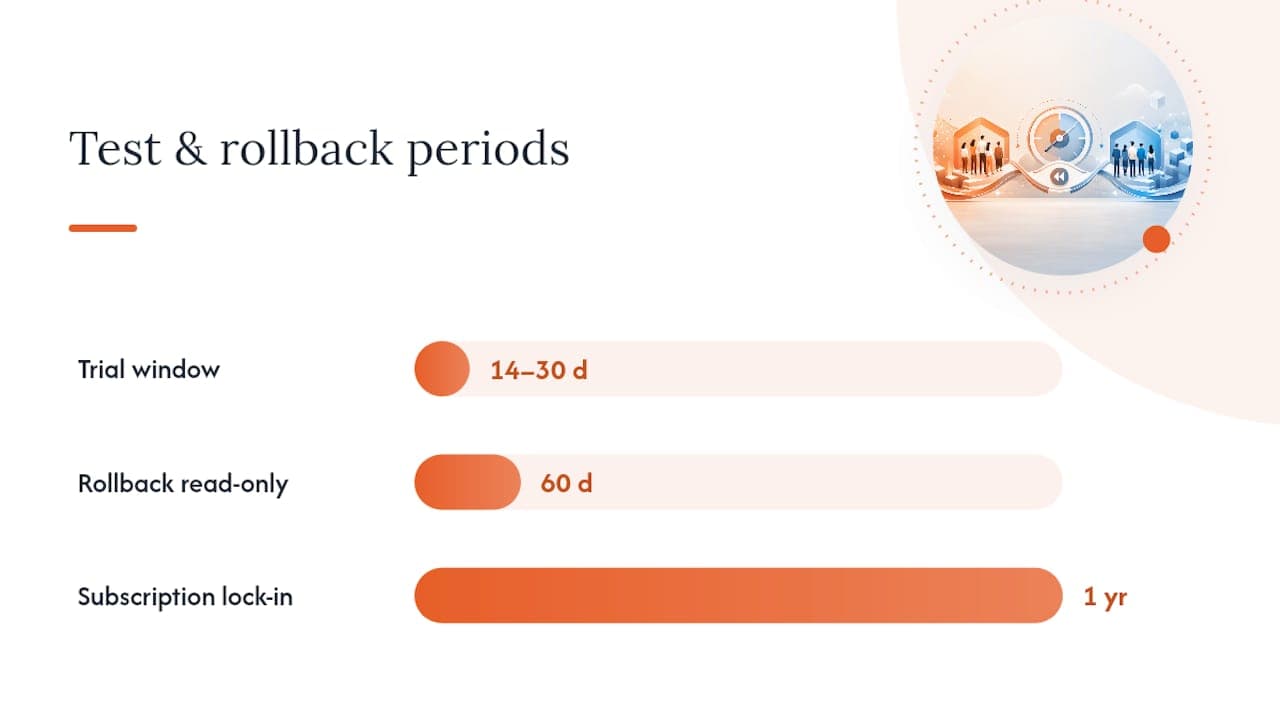
Pro Tip: Run a real trial, not a demo. Import one full month of actual bank transactions, run a mock payroll cycle, and pull the three reports you check most often. That’s the only way to catch a workflow gap before you’re locked into a year of subscription billing.
During a 14 to 30 day trial, test bank feed accuracy against your real accounts, confirm payroll journal entries post the way your bookkeeper expects, and count how many clicks it takes to close a month. Watch for migration red flags too: incomplete historical data import, broken bank connections after switching, or a chart of accounts that doesn’t map cleanly. Keep your old platform active on a read-only basis for 60 days as a rollback plan, just in case.
When Does Automation Matter More Than the Platform You Pick?
Sometimes the platform isn’t the bottleneck. If your team spends hours each week on manual data entry, matching receipts, or reconciling multiple sales channels, the fix often isn’t switching from QuickBooks to Xero or back. It’s automating the repetitive work sitting on top of whichever platform you already use.
Arosplatforms builds custom AI systems that plug into existing accounting software rather than replacing it, and clients working with this kind of automation approach commonly see returns within twelve months alongside meaningfully faster turnaround on manual tasks. The logic is simple:
- If your core complaint is “we’re always behind on reconciliation,” automation on top of your current platform often beats a full migration.
- If your core complaint is “we don’t have the feature we need at all” (no native payroll, no inventory tracking), that’s a genuine platform-fit problem worth solving with a switch.
- Before hiring an automation partner, check whether your platform’s API and webhook support are strong enough to sustain a reliable, low-maintenance integration.
Our Take: Pick by Payroll and Inventory First
Most SMBs overthink this decision. In practice, it comes down to two questions: do you need native payroll and inventory in one tool, and will your team outgrow a seat cap? Integration openness is the tiebreaker when those two answers are close. Whatever you choose, run one full sample month through the platform with your CPA before committing to a full migration. That single test catches more problems than any feature checklist.
— arosplatforms team
Cut the Manual Work, Whichever Platform You Choose
Switching between QuickBooks and Xero solves a feature gap. It doesn’t solve the hours your team loses to manual reconciliation, receipt chasing, or copying numbers between systems. Arosplatforms builds custom AI systems that sit on top of your existing accounting platform, automating the repetitive bookkeeping work that neither QuickBooks nor Xero fully solves on its own, and clients typically see faster turnaround on those tasks without ripping out software that already works. If your books are accurate but the process to get there is slow, an AI operating system built around your actual workflow may deliver more value than another year of platform comparison shopping. Book a discovery call to see where automation fits before you touch your accounting stack.
Sources
- Xero vs QuickBooks: 2026 Comparison - Intuit
- QuickBooks Online vs. Xero: Which Will Make Your Books a Breeze? - PCMag UK
- QuickBooks vs Xero (2026) - MakerStack
FAQ
Do Accountants Prefer Xero or QuickBooks?
It splits by specialty: many U.S. accountants default to QuickBooks because of its market share and native payroll, while bookkeepers focused on cloud-first workflows often favor Xero’s faster bank reconciliation. Ask your specific accountant which they use daily before assuming either preference applies to you.
What Software Is Replacing QuickBooks for Some Businesses?
Xero is the most common switch-to option for businesses that outgrow QuickBooks’ user seat caps or want a lighter, integration-first tool. Neither is replacing the other outright. The choice depends on whether payroll and inventory or unlimited users and lower mid-tier cost matter more to your business.
Why Is QuickBooks Increasing Its Prices?
QuickBooks has raised list prices across several tiers heading into 2026, a trend documented in recent pricing comparisons, and renewal uplifts can add further cost year to year. Always check your renewal notice against current published pricing before auto-renewing.
Why Don’t Some Accountants Like QuickBooks?
Common complaints center on rising subscription costs, seat limits that force plan upgrades as teams grow, and reconciliation workflows that some bookkeepers find slower than Xero’s. These are trade-offs, not universal flaws. QuickBooks still leads on native payroll and inventory depth, which offsets those complaints for many product-based businesses.
Can Automation Reduce the Cost Difference Between QuickBooks and Xero?
Yes, in practice. Automating manual entry, reconciliation, and reporting tasks on top of either platform can shrink the labor cost gap between them, since much of the “cheaper platform” savings gets eaten by manual workarounds anyway.
Recommended
Related: custom AI development.