How to Reduce Manual Data Entry for Finance Teams
How to Reduce Manual Data Entry for Finance Teams

What actually works to cut manual data entry in finance
Manual data entry consumes 40–60% of finance team member hours, often equating to multiple full-time equivalents dedicated to transcription. The fastest way to reclaim that capacity is to target automation at the highest-volume, most repetitive tasks first: invoice processing, expense reports, bank reconciliation, and recurring journal entries. AI-powered document extraction, direct ERP integrations, and rules-based workflow automation each attack a different layer of the problem, and together they can reduce manual tasks by 60–90% while cutting error rates from a typical 1–4% down to below 0.5%.
The benefits are measurable and arrive quickly. Finance teams that automate document processing report faster close cycles, fewer corrections, and staff who spend their days on analysis rather than transcription. The main ROI of automation comes from capacity creation and workforce retention, not headcount reduction; freed capacity is redeployed into forecasting, vendor negotiation, and strategic reporting.
Practical first steps to start:
- Map where your team’s hours actually go for two weeks before touching any tool.
- Identify the single document type consuming the most entry time (almost always invoices).
- Select an AI extraction tool that connects directly to your ERP or accounting system.
- Run a two-week parallel process: manual entry alongside automated extraction, then compare accuracy.
- Expand to receipts, expense reports, and bank statements once invoices are stable.
- Define exception-handling rules so staff know exactly which items need human review.
- Set baseline metrics (hours per week, errors per 100 documents, cycle time) before go-live so you can measure the actual gain.
Why finance teams are still buried in manual entry
The root cause is rarely laziness or bad habits. It is structural: most finance operations run on systems that were never designed to share data with each other.

Finance professionals spend over 20% of their day switching between disconnected systems and re-entering data. An ERP holds actuals, a separate tool manages expenses, payroll lives somewhere else, and the bank sends a PDF. Getting a consolidated picture means someone exports, reformats, and pastes, every single period.
The specific tasks generating the most manual work:
- Invoice keying: A single invoice requires numerous fields. A mid-market company processing a high volume of invoices monthly may spend hundreds of hours on data entry.
- Expense report processing: Each report bundles 5–15 receipts that need itemizing, categorizing, and policy validation. The entry is fast; the policy checks are what drain time.
- Bank statement reconciliation: Monthly statements carry 200–500 transaction lines, and a single missed line throws off the entire reconciliation.
- Spreadsheet aggregation: Budget actuals, variance reports, and management packs get assembled by hand from multiple exports, introducing version-control risk at every step.
- Recurring journal entries: Month-end accruals, prepayments, and intercompany entries often get re-keyed from prior-period templates rather than automated.
- Vendor and customer master data updates: New vendors, address changes, and payment terms get entered manually across multiple systems with no single source of truth.
Volume compounds everything. Inconsistent document formats, multiple approval handoffs, and the absence of standardized data flows mean that even a well-run team spends a disproportionate share of its week on work that adds no analytical value.
Step-by-step automation strategies for finance teams
The most common mistake is trying to automate every document type at once. Sequence matters.
-
Map current workflows before selecting any tool. Spend one week documenting each process: who touches it, how long each step takes, where errors occur, and what systems are involved. A broken workflow automated is a broken workflow running faster.
-
Start with invoice automation. Invoices eat the most entry time per document, arrive in the highest volume, and have the most standardized field structure, so AI accuracy is highest right away. Phased automation starting with invoices followed by receipts and bank statements reduces implementation risk and builds team confidence.
-
Run a parallel process for the first two weeks. Process invoices both manually and through AI extraction simultaneously, then compare outputs. This surfaces edge cases specific to your vendor mix before you rely on the tool fully.
-
Add receipts and expense reports second. Receipt quality is variable: faded thermal paper, bad angles, handwritten totals. AI extraction handles these faster than any clerk can, and policy rules (per-diem caps, category codes, approval thresholds) can run automatically in the background.
-
Automate bank statement feeds third. Bank statements are highly structured, so extraction is straightforward. Configure validation rules to confirm that extracted transaction totals match opening and closing balances before approving each batch.
-
Integrate directly with your ERP. Tools with pre-built connectors to SAP, Oracle, NetSuite, Microsoft Dynamics, and QuickBooks post clean data directly to the right account without a manual import step. Direct integration is what turns extraction into true straight-through processing.
-
Define exception routing clearly. Automation handles the majority of routine transactions. The remaining exceptions need a clear queue, an owner, and a resolution SLA. Without this, exceptions pile up and erode confidence in the whole system.
-
Measure, then expand. Track hours on data entry, errors per 100 documents, and per-document cycle time at one month and three months post-launch. Use those numbers to justify expanding automation to recurring journal entries, AR collections outreach, and standard financial reports.
The AI agents and automation capabilities available to finance teams in 2026 cover this entire sequence, from document ingestion through ERP posting, without requiring engineering resources to configure.

Core technologies that eliminate finance data entry
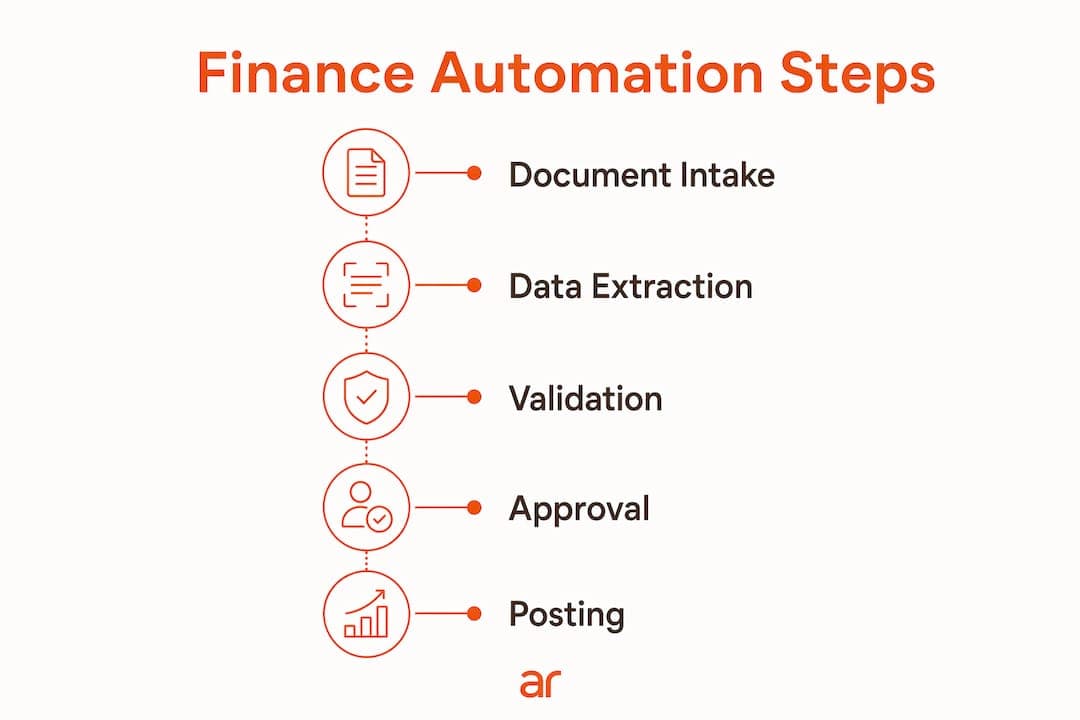
Understanding what each technology actually does prevents teams from buying tools that overlap or miss the real bottleneck.
-
AI-powered document extraction (OCR + large language models): Reads invoices, receipts, bank statements, and expense reports regardless of layout, then outputs structured data fields directly to a spreadsheet or ERP. Unlike older template-based OCR, modern LLM-based extraction understands document structure contextually, so it handles new vendor formats without retraining.
-
Workflow automation: Manages the sequence of steps after extraction: data validation, three-way PO matching, approval routing, and exception flagging. Rules engines enforce business logic (approval thresholds, cost center assignments, policy limits) consistently across every transaction, removing the human judgment calls that slow processing.
-
Direct system integrations: When your ERP connects to bank feeds, payroll, expense management, and billing platforms, transactions flow in automatically with dates, amounts, and basic classifications already populated. Pair that with coding rules and 80–90% of entries post straight through, leaving only exceptions for human review.
-
Rules engines and compliance checks: Encode your chart of accounts, approval hierarchies, and policy limits once. The engine applies them to every document, every time, catching out-of-policy items before they reach an approver rather than after they post to the ledger.
-
Audit trail automation: Every extraction, coding decision, exception, and approval gets logged against the document and the transaction. Audit requests that previously required hours of evidence gathering take minutes. This matters especially in SOX-aware environments where demonstrating control over financial data is a recurring requirement.
Good data quality practices underpin all of these technologies. Automation reads what is there; if vendor names are inconsistent or account codes are nonstandard, the system propagates those inconsistencies at scale rather than correcting them.
How to prepare your team for automation without disruption
Automation fails most often not because the technology is wrong, but because the organization was not ready for it.
-
Audit current workflows for bottlenecks first. Identify where delays, rework, and errors actually occur before selecting a tool. Automating a flawed process replicates the flaw faster.
-
Standardize data formats and chart of accounts. Process standardization, including chart of accounts alignment and consistent data schemas, is the technical prerequisite for accurate automation. Vendor names, account codes, cost center labels, and entity identifiers need to be consistent across systems before any AI tool can code reliably.
-
Reframe automation for your team. Staff who spend their days on data entry often worry that automation threatens their jobs. The evidence runs the other way: the main ROI of automation comes from capacity creation and workforce retention, not headcount reduction. Teams that automate entry see AP roles shift toward exception management, vendor analysis, and forecasting support.
-
Design training around the new workflow, not the old one. Train staff on reviewing extracted data, resolving exceptions, and interpreting the audit log rather than on data entry mechanics. The skill set shifts from transcription accuracy to judgment and analysis.
-
Phase the rollout deliberately. Start with one document type, one team, and a clear success metric. Expand only after the first phase is stable and the team trusts the output.
Pro Tip: Begin with the most structured document type your team handles, typically a standard vendor invoice from a high-volume supplier. Structured inputs give AI extraction its highest accuracy rate from day one, which builds team confidence faster than starting with messy receipts or variable-format statements.
What the research and practitioners say about finance automation
Finance automation is not a future-state aspiration. The productivity data from teams that have already made the shift is concrete.
Finance teams integrating AI agents for tasks like invoice processing gain 40–50% faster close cycles and 60–75% time savings on routine activities. AWS Finance teams demonstrated what this looks like at scale: by deploying AI agents for target-setting analysis, they cut per-customer analysis time from approximately 6 hours to approximately 10 minutes, and eliminated the manual Monday-morning routine for weekly business review preparation entirely.
The workforce impact is equally significant. When repetitive transcription work disappears, finance roles become more analytical and more interesting. Retention improves because the job changes in a way that benefits the people doing it.
The productivity case in numbers:
| Metric | Manual baseline | Post-automation target |
|---|---|---|
| Hours on data entry | Significant portion of team hours | Substantial reduction |
| Error rate per 100 documents | Typical error rates | Much lower error rates |
| Invoice cycle time | Several business days | Reduced cycle time |
| Close cycle speed | Baseline | Faster close cycles |
Finance leaders who have gone through this transition consistently report the same sequence: skepticism from the team, a two-week parallel run that builds confidence, and then a rapid shift in how the team spends its time. Controllers who spent the first week of every month reconciling entry errors start closing faster and spending more time on analysis. The financial services AI applications that enable this shift are mature enough in 2026 that implementation risk is low when the rollout is phased correctly.
Arosplatforms works with finance teams to build customized AI operating systems that embed directly into existing workflows, covering document extraction, ERP integration, exception routing, and audit trail automation without vendor lock-in. Teams that have gone through this process report 40–50% faster close cycles and 60–75% time savings on routine activities, with most seeing measurable ROI within twelve months.

If your team is ready to move from manual transcription to exception-driven finance operations, Arosplatforms’ US enterprise consulting is built for exactly that transition.
Key Takeaways
Automating high-volume, repetitive finance tasks like invoice processing reduces manual entry by 60–90%, cuts error rates from a typical 1–4% down to below 0.5%, and frees teams to focus on analysis and strategic work.
| Point | Details |
|---|---|
| Start with invoices | Invoices consume the most entry time and have the most standardized structure, giving AI the highest accuracy from day one. |
| Standardize before automating | Align chart of accounts and data schemas first; automation propagates inconsistencies if data is not clean. |
| Run parallel for two weeks | Processing manually and through AI simultaneously builds team confidence and surfaces edge cases before full rollout. |
| Measure three metrics | Track hours on entry, errors per 100 documents, and cycle time at one and three months post-launch. |
| ROI comes from redeployment | The main ROI of automation comes from capacity creation and workforce retention, not headcount reduction; freed capacity goes into forecasting and analysis, which improves retention and team satisfaction. |
FAQ
How do you reduce manual data entry in finance?
Replace keyboard transcription with AI document extraction that reads invoices, receipts, and bank statements, then outputs structured data directly to your ERP. Start with invoices, run a two-week parallel process to validate accuracy, and expand to other document types once the first phase is stable.
How do you reduce manual data entry errors in finance?
AI extraction cuts error rates from a typical 1–4% down to below 0.5% by reading source documents directly rather than relying on human transcription. Pairing extraction with automated validation rules and three-way PO matching catches discrepancies before they post to the ledger.
How do you reduce manual data entry in expense processing?
Automate receipt capture with AI that reads faded or photographed receipts, matches them to card transactions, and applies policy rules (per-diem caps, category codes, approval thresholds) automatically. Clean submissions flow straight through; only out-of-policy items reach a human reviewer.
What are the biggest challenges with manual data entry in finance?
The core challenges are time consumption (40–60% of team hours), error rates of 1–4% that compound across high-volume periods, fragmented systems that force re-entry of the same data in multiple places, and audit trails that are incomplete when entries come through email or ad hoc spreadsheets.