AI-Powered Accounts Payable Automation for Finance Leaders
AI-Powered Accounts Payable Automation for Finance Leaders
AI meaningfully accelerates accounts payable when it’s paired with real controls: it reads invoices, matches them against purchase orders, flags anomalies, and routes exceptions to the right person, cutting cycle times while leaving a clean audit trail. Six core AP areas benefit most, according to Forrester: capture, matching, fraud management, payment optimization, e-invoicing, and reporting. Arosplatforms clients embedding this kind of system have seen 82% faster turnaround on key tasks. Start small: pilot one invoice channel before expanding.
TL;DR:
- AI accelerates invoice processing, with some clients achieving 82% faster turnaround times by starting with high-volume, standardized vendors.
- The main benefits include instantaneous data extraction, improved accuracy, early payment discounts, and effective fraud detection.
- A phased pilot focused on a single vendor category helps ensure success before expanding to more complex or varied invoice types.
- Clear governance, explainability, and vendor ownership are critical risks to address before full deployment, especially in audit scenarios.
- ROI typically materializes within several months, especially when data is clean, processes are standardized, and integration is straightforward.
Table of Contents
- Why Accounts Payable Automation AI Matters Now
- What Are the Core AI Use Cases in Invoice Processing?
- How Do You Roll Out AI for Accounts Payable?
- What ROI Should Finance Leaders Expect?
- What Risks Come With AI in Accounts Payable?
- Real-World Lessons From Arosplatforms Deployments
- Build, Buy, or Hire a Consultancy?
- Getting Vendor Onboarding and Master Data Right
- What Do AI-Powered AP Solutions Cost?
- What Compliance Rules Apply to AI in AP?
- How AI Changes What Finance Teams Actually Do
- Arosplatforms: A Custom AI Operating System for AP
- Sources
- FAQ
Why Accounts Payable Automation AI Matters Now
Most AP teams aren’t slow because people are lazy. They’re slow because invoices arrive in a dozen formats, purchase orders live in a different system than the invoices, and every exception requires someone to stop, dig through email, and make a judgment call. That’s the actual problem accounts payable automation AI solves, and it’s worth naming the five places it moves the needle.
Speed. Machine learning models read a PDF, a scanned fax, or an emailed invoice and extract vendor, amount, line items, and PO number in seconds instead of the minutes a human keyer needs. Accuracy. Extraction models trained on invoice layouts catch transposed digits and mismatched tax codes that tired eyes miss on invoice number 400 of the day. Cash optimization. Once processing time drops, finance teams can actually capture early-payment discounts instead of missing them because the invoice was still in someone’s inbox on day 25. Fraud detection. Pattern-matching models flag duplicate invoice numbers, slightly altered bank details, or a new vendor invoicing suspiciously similar amounts to an existing one. Analytics. Every processed invoice becomes structured data, which means real forecasting instead of guesswork about next month’s cash position.
Forrester’s 2025 research frames these as the six areas where AI delivers concrete value in AP: invoice data capture, invoice matching, reporting and dashboarding, fraud management, payment management, and e-invoicing/tax compliance. That’s a useful checklist for prioritizing where to start.
Quick math on impact:
- Manual invoice processing commonly runs 10 to 15 days per invoice cycle in unautomated environments
- AI-assisted extraction and matching can compress that to same-day or next-day processing for clean invoices
- Fraud and duplicate-detection models catch patterns that spreadsheet-based reviews routinely miss
The pattern across every one of these areas is the same: AI removes repetitive judgment calls, and humans keep the judgment calls that actually require judgment.
What Are the Core AI Use Cases in Invoice Processing?
Accounts payable automation AI isn’t one tool. It’s a chain of specific techniques applied at each step between “invoice arrives” and “payment sent.” Understanding the chain helps you decide where to automate first.
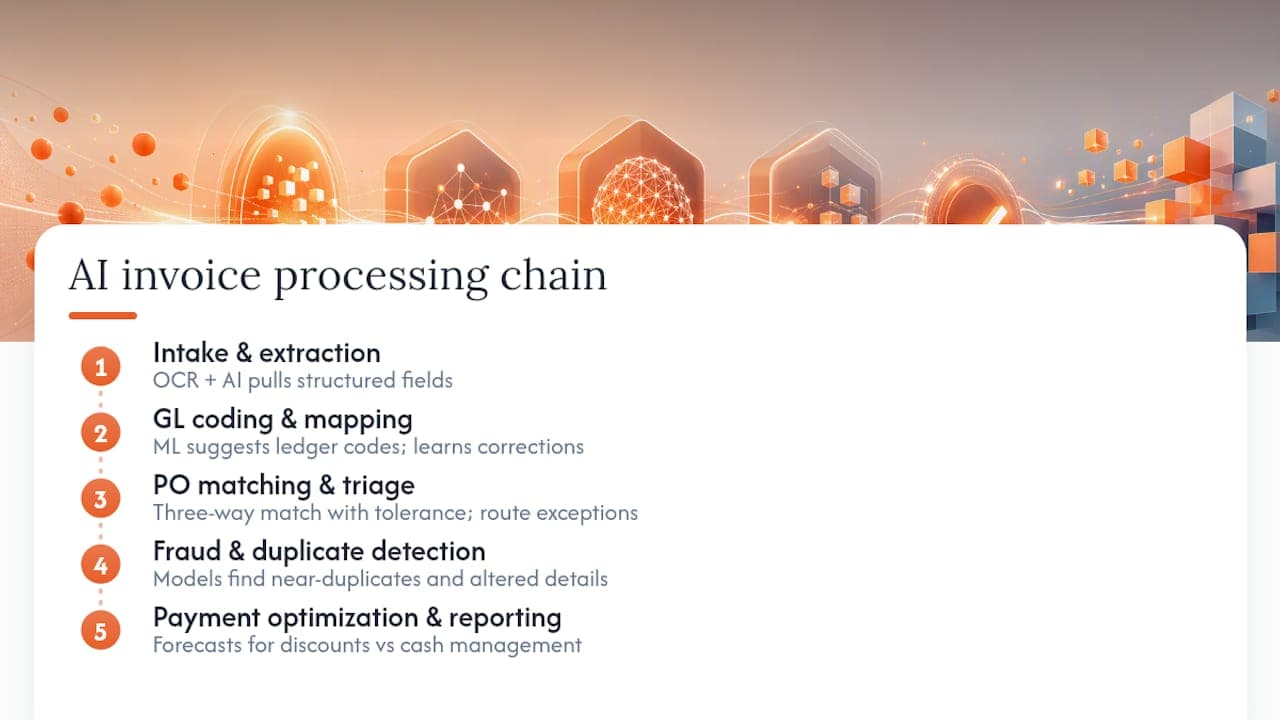
Intake and document processing. Optical character recognition paired with AI extraction pulls structured fields (vendor name, invoice number, amounts, dates, line items) out of unstructured documents. Microsoft’s AI Builder invoice processing model is a good illustration of how this works in practice: a prebuilt model handles standard invoice fields out of the box, and when confidence on a given field drops below a set threshold, the system either flags it for review or falls back to a custom model trained on that specific vendor’s layout. That fallback pattern matters more than it sounds. Vendors with unusual formats, foreign-language invoices, or region-specific tax fields are exactly where generic extraction breaks down, and a well-designed system routes those cases differently instead of forcing bad data downstream.
GL coding and account mapping. Once fields are extracted, machine learning models suggest the general ledger code based on vendor history, invoice description, and department, learning from every correction an AP clerk makes.
PO matching with tolerance logic. Three-way matching (invoice, purchase order, receipt) used to mean a human eyeballing three documents. AI-driven matching applies configurable tolerance bands, automatically approving a $1,002 invoice against a $1,000 PO if it falls inside policy, and routing anything outside that band for review.
Exception triage. When something doesn’t match, the system builds a context package (the invoice, the PO, the vendor history, the likely cause) and routes it to the right approver instead of dumping a bare error message into someone’s queue.
Fraud and duplicate detection. Models trained on historical invoice patterns catch near-duplicate invoice numbers, altered bank routing details, and vendors invoicing amounts just under approval thresholds, a classic fraud signature.
Payment optimization. Cash forecasting models identify which invoices to pay early for discount capture versus which to hold to the due date for cash flow management. Vendor-reported systems in this space claim per-invoice processing as fast as seven seconds for clean, high-confidence documents, though that figure reflects best-case conditions, not average throughput.
Reporting and predictive analytics. Structured invoice data feeds forecasting models that predict upcoming cash needs by vendor, department, and payment terms.
Pro Tip: Don’t try to automate every invoice type on day one. Start with your highest-volume, most standardized vendor category (utilities, recurring SaaS invoices, or a single major supplier) and prove the model’s confidence rate before expanding to messier document types.
How Do You Roll Out AI for Accounts Payable?
A rushed AP automation rollout usually fails for one of two reasons: the data wasn’t ready, or nobody defined what success meant before go-live. Here’s a sequence that avoids both traps.
- Run an evaluation checklist first. Confirm data readiness (are invoices arriving in consistent channels, or scattered across email, fax, and portal uploads?), integration feasibility with your ERP, and whether the vendor or internal team can produce auditable, explainable decisions, not just a black-box confidence score.
- Design a real pilot. Pick one invoice channel or vendor category, define KPIs upfront (touchless processing rate, average cycle time, exception rate), and set acceptance criteria before the pilot starts, not after you see the results.
- Map the integration points. You need clarity on inbound channels (email, EDI, vendor portal), how extracted data posts into your ERP’s chart of accounts, and how vendor master data stays synchronized between systems.
- Build governance in from the start. Segregation of duties still applies when AI does the matching. Someone who can adjust vendor bank details shouldn’t also be able to approve payments to that vendor. Immutable audit logs and model monitoring for drift belong in the initial design, not bolted on after an audit finding.
- Set a realistic timeline with decision gates. Most well-scoped pilots run 60 to 90 days from data connection to a go/no-go decision, followed by phased expansion to additional vendor categories over the following two to three quarters.
Pro Tip: Require your pilot to report a confidence score on every extracted field, not just an overall accuracy number. A model can hit 95% aggregate accuracy while systematically failing on one vendor’s invoice format, and you won’t see that problem in the headline metric.
Microsoft’s own guidance on combining prebuilt and custom models reflects this same philosophy: layer a general model for the common case, then add targeted training for the vendors that consistently trip up the default approach.
What ROI Should Finance Leaders Expect?
The business case for AI in AP comes down to three convertible metrics: time, error rate, and touchless processing.
Processing time reductions are commonly significant when moving from fully manual entry to AI-assisted extraction and matching, though the exact impact depends heavily on invoice format consistency. Error rates drop correspondingly, since a model applying the same extraction logic to invoice 1 and invoice 10,000 doesn’t get fatigued the way a person does by 4 p.m.
Converting operations to dollars:
- Calculate hours saved per invoice (manual entry and matching time minus AI-assisted time), multiply by invoice volume, and translate to FTE-equivalent capacity freed up
- Add early-payment discount capture that was previously missed due to slow processing
- Factor in reduced duplicate-payment and fraud losses, which are hard to quantify precisely but real in any high-volume AP operation
- Subtract implementation, integration, and ongoing monitoring costs to get net ROI
Payback periods vary, often falling within several months, influenced mainly by the extent of custom integration work your ERP and vendor mix require. Organizations with clean, standardized invoice formats and a single ERP instance land at the faster end. Multi-entity organizations with fragmented vendor master data and legacy ERP customizations take longer to break even, mostly because more of the early budget goes to integration rather than model training.
The lever that shortens payback fastest isn’t a better model. It’s cleaner starting data and a tighter pilot scope.
What Risks Come With AI in Accounts Payable?
AI in AP isn’t risk-free, and finance leaders who treat it as a plug-and-play upgrade get burned by the same handful of issues.
- Explainability gaps. If your extraction or coding model can’t show why it flagged (or didn’t flag) an invoice, you have an audit problem waiting to happen. Require confidence thresholds on every field, not just a pass/fail output.
- Security and data governance. Invoice data includes vendor banking details and payment records. Contracts with any AI vendor should specify data handling, encryption standards, and breach notification terms explicitly.
- Model drift. A model trained on last year’s vendor mix degrades as new suppliers, formats, and tax rules appear. Ongoing monitoring, not a one-time training run, keeps accuracy from quietly eroding.
- Vendor lock-in. If you can’t export your training data, your extraction rules, or your historical decisions in a portable format, you’ve traded a manual bottleneck for a contractual one.
- Audit readiness gaps. Immutable logs and clear delegation-of-authority rules need to exist before your first audit, not be reconstructed after one.
Pro Tip: Before signing with any AI vendor, ask specifically who owns the trained model and the historical decision data if you switch providers. A surprising number of contracts leave that ambiguous, and it only becomes a problem when you’re trying to leave.
Real-World Lessons From Arosplatforms Deployments
Arosplatforms clients embedding AI directly into operations report an average 82% faster turnaround on key tasks, with many seeing measurable ROI inside twelve months. Two implementation patterns from adjacent domains carry lessons directly applicable to AP.
- The AI underwriting automation case study shows how document-heavy, decision-intensive workflows benefit from routing low-confidence cases to human reviewers rather than forcing full automation from day one.
- The AI claims processing implementation illustrates exception handling at scale: building context packages around flagged items so the human reviewer isn’t starting from zero.
Both cases share a lesson that transfers directly to invoice-to-pay workflows: automation succeeds when it’s designed around the exception path, not just the clean-case happy path. The full use-case library documents additional implementations across industries facing similar document-processing and governance challenges.
Build, Buy, or Hire a Consultancy?
Every finance leader evaluating accounts payable automation AI eventually faces the same three-way decision, and the right answer depends less on budget than on how unusual your invoice mix and integration requirements are.
Build in-house if you have engineering resources dedicated to finance systems and highly specific workflow needs that off-the-shelf tools don’t address well. This path gives maximum control but demands ongoing model maintenance that most finance teams underestimate.
Buy packaged AI features bundled into your existing AP software if your invoice formats are standard and your ERP integration is straightforward. This is the fastest path to value for simpler operations, though customization options are usually limited.
Hire a consultancy to design a custom system when your operations span multiple entities, ERPs, or highly specific compliance requirements that packaged tools handle poorly. This route costs more upfront but produces a system built around your actual workflow instead of a generic template.
- Ask any vendor or consultancy how confidence thresholds are set and whether they’re configurable per vendor category.
- Ask who owns the model and the historical training data if the relationship ends.
- Ask for a sample audit log to confirm decisions are traceable end to end.
- Ask how the system handles a completely new vendor with no historical data.
Red flags that should stop a deal: opaque decision logic with no confidence scoring, no audit trail export option, and any contract silent on data portability. A vendor unwilling to answer the ownership question directly is telling you something.
Getting Vendor Onboarding and Master Data Right
Invoice processing accuracy collapses fast when vendor master data is wrong, duplicated, or inconsistent across systems, and AI can’t extract its way out of a bad vendor record. Automating vendor onboarding solves a problem that predates AI entirely: the same supplier entered three different ways across three ERPs, each with slightly different banking details.

AI-assisted onboarding validates new vendor submissions against existing records before creating a duplicate, checks tax ID formats against known patterns, and flags banking detail changes for manual verification, a common fraud vector when a compromised email requests a “routing number update.” Master data management tools increasingly use matching algorithms to detect near-duplicate vendor entries (slightly different spelling, same tax ID) that manual review misses at scale.
The practical sequence: clean your existing vendor master file before automation goes live, not after. Migrating messy data into a smarter system just produces faster, more confident wrong answers. Set validation rules for new vendor creation (required fields, tax ID verification, banking detail confirmation via a secondary channel) and require dual approval for any banking detail change on an existing vendor record, regardless of how the change request arrived.
Done well, this piece of the puzzle is unglamorous but disproportionately important. Most AP fraud losses trace back to vendor master manipulation, not invoice-level trickery, which makes onboarding controls one of the highest-leverage investments in the entire automation project.
What Do AI-Powered AP Solutions Cost?
Pricing for accounts payable automation AI generally falls into three models, and picking the wrong one for your invoice volume is a common budgeting mistake.
Per-invoice or per-transaction pricing charges a fee for each invoice processed, which scales predictably with volume but can get expensive fast for high-volume operations processing tens of thousands of invoices monthly.
Subscription or seat-based pricing charges a flat monthly or annual fee regardless of volume, often tiered by feature set (basic extraction versus full matching, fraud detection, and analytics). This works better for organizations with stable, predictable invoice volumes.
Project-based consulting engagements, the model a custom AI operating system typically follows, charge for the design and build of a system tailored to your specific ERP, vendor mix, and compliance requirements, with optional ongoing managed services after deployment.
Beyond the headline price, factor in integration costs (connecting to your ERP and vendor portals), training data preparation if custom models are needed for non-standard vendors, and ongoing monitoring to catch model drift. Packaged tools often look cheaper upfront but carry hidden costs when your invoice formats don’t fit their standard templates, requiring workarounds that eat into the promised time savings. A process automation approach that’s scoped to your actual operations, rather than a generic per-seat license, tends to reveal its true cost structure earlier in the evaluation, before you’ve committed budget.
What Compliance Rules Apply to AI in AP?
AI in accounts payable touches several regulatory areas simultaneously, and finance leaders need to know which rules apply to their specific situation rather than assuming a single blanket standard covers everything.
Financial record retention requirements (how long invoice and payment records must be kept, and in what format) still apply regardless of whether a human or a model processed the transaction. AI doesn’t change your obligation to maintain auditable records; if anything, it raises the bar, since auditors increasingly expect to see not just the transaction record but the basis for any automated approval decision.
Data privacy rules covering vendor and payment information (banking details, tax identification numbers) apply to AI systems the same way they apply to any system storing that data. If your AP operation spans multiple jurisdictions, the specific privacy framework governing vendor data varies by where that vendor and your legal entity are located, and that’s a question for legal counsel, not a generic compliance checklist.
E-invoicing and tax compliance rules are increasingly jurisdiction-specific, with several countries mandating structured e-invoice formats and real-time reporting to tax authorities. Forrester’s analysis names e-invoicing and tax compliance as one of the six core areas where AI delivers value precisely because keeping up with these shifting requirements manually is increasingly impractical.
Segregation-of-duties requirements under internal control frameworks don’t disappear because AI does the matching. The control still needs a human checkpoint at the right junction, documented and testable by an auditor.
How AI Changes What Finance Teams Actually Do
The honest shift isn’t fewer AP jobs. It’s a different job. Data entry and three-way matching move to machines; judgment on exceptions, vendor disputes, and policy exceptions stays human, and arguably gets more interesting. In the first 90 days after go-live, expect a learning curve as your team builds trust in confidence scores instead of re-checking everything manually. Within a year or two, expect AP operations to run largely autonomous for clean invoices, with humans concentrated entirely on the cases that genuinely need a decision.
— arosplatforms team
Arosplatforms: A Custom AI Operating System for AP
Packaged AP software gives you someone else’s workflow with a few settings to adjust. Arosplatforms builds the opposite: a custom AI operating system designed around your specific ERP, vendor mix, and approval structure, embedded directly into how your finance team already works rather than forcing your team to adapt to a template. That means confidence thresholds tuned to your actual vendor formats, governance built around your existing segregation-of-duties rules, and full ownership of the system so you’re never locked into a single provider’s roadmap. Clients embedding this approach report an average 82% faster turnaround on key tasks, with ROI commonly landing inside twelve months. If your invoice mix, entity structure, or compliance requirements make a generic tool feel like a workaround, browse the use-case library for implementation patterns, then request a briefing to scope what a custom AP system would look like for your operation.
Sources
- Top AI Use Cases For Accounts Payable Automation In 2025
- Prebuilt invoice processing — AI Builder | Microsoft Learn
FAQ
How Can AI Be Used in Accounts Payable?
AI extracts invoice data, matches invoices to purchase orders and receipts, flags fraud and duplicate payments, routes exceptions to the right approver, and forecasts cash needs based on historical payment patterns.
Will AI Replace Accounts Payable Jobs?
AI replaces repetitive data entry and matching tasks, but it shifts AP staff toward exception handling, vendor relationship management, and policy decisions rather than eliminating the function entirely.
Can You Fully Automate Accounts Payable?
Most organizations achieve high touchless processing rates for standardized, high-confidence invoices, but full automation without any human checkpoint is rare and generally not advisable given audit and fraud-control requirements.
How Long Does It Take to See ROI From AP Automation AI?
Payback periods often fall within several months, influenced mainly by invoice format consistency, ERP integration complexity, and the number of vendor categories included in the initial rollout.
What’s the Difference Between Packaged AP Software and a Custom AI System?
Packaged software applies a standard workflow across all customers, while a custom AI operating system, the approach arosplatforms uses, builds governance, confidence thresholds, and integrations around one organization’s specific vendor mix and ERP setup.