What Is an Intelligent Matter Intake Workflow?
What Is an Intelligent Matter Intake Workflow?

An intelligent matter intake workflow is an automated, data-first process that captures a legal request, classifies and enriches it with AI, checks it against conflicts, and routes it to the right attorney, without a human retyping information into three different systems. The decision rule is simple: if your team handles more than a handful of new requests a week, if nobody can say where a request sits right now, or if the same intake form gets manually re-keyed into your CLM or matter management tool, you need one.
Three concepts anchor the definition:
- Conflict checks run early, before a matter gets created, not after.
- Triage separates urgent, high-risk requests from routine ones.
- CLM integration means intake data flows into contract and matter systems without manual re-entry.
Key Takeaways
An intelligent matter intake workflow succeeds when it gates conflicts early, routes requests using AI classification instead of manual sorting, and feeds clean data directly into CLM and matter management systems.
| Point | Details |
|---|---|
| Definition matters | Intelligent intake uses AI to classify, extract data, and score priority, not just automate a form. |
| Gate conflicts first | Enforce conflicts checks as a hard step before matter creation, with any bypass logged and explained. |
| Pilot before you scale | Test one or two request types with defined KPIs before rolling out across every business unit. |
| Track the right metrics | Cycle time, time-to-assignment, and auto-routed percentage tell you when to expand automation. |
| Consider outside help | Arosplatforms offers discovery-to-handover consultancy engagements for teams building custom intake workflows without vendor lock-in. |
Table of Contents
- What Is Matter Intake, and What Makes a Version of It “Intelligent”?
- The Core Stages Every Intake Workflow Needs
- How AI Turns Automated Intake Into Intelligent Intake
- Why Intelligent Intake Is Worth the Build
- Designing Forms and Governance That Actually Hold Up
- Rolling Out Intelligent Intake Without Betting the Farm
- The KPIs That Prove the Workflow Is Working
- Evaluating Tools Without Getting Locked Into a Bad Fit
- Build In-House or Bring in Outside Help?
- Getting Buy-In So the Rollout Actually Sticks
- Keeping Matter Intake Secure and Compliant
- Planning for Growth Without Rebuilding From Scratch
- What Intelligent Intake Costs, and What It Returns
- Where Rollouts Usually Go Wrong
- If You Need a Partner to Build This Right the First Time
- Sources
- FAQ
What Is Matter Intake, and What Makes a Version of It “Intelligent”?
Legal intake, in its plain form, is the structured process of receiving, evaluating, and routing a legal request. It answers four practical questions: does this fit the team’s scope, is the matter understood well enough to staff it, can the team actually deliver, and what happens next. That framing comes from how legal intake connects to downstream onboarding and CLM workflows, and it holds whether the process is a paper form or a fully automated system.
“Automated” intake and “intelligent” intake are not the same thing. Automated intake removes manual steps, think a web form that emails the right inbox. Intelligent intake adds judgment: it reads the free text of a request, extracts entities like contract type or jurisdiction, scores urgency, and recommends an assignee based on current workload. The vocabulary worth knowing:
- NLP classification: software reads a request description and tags its category automatically.
- Metadata extraction: pulling structured fields (parties, dates, dollar amounts) out of unstructured text or attachments.
- Conditional logic: forms that show or hide questions based on earlier answers.
- Matter management: the system of record that tracks a matter once intake creates it.
Modern platforms increasingly combine structured data capture with automated routing and system integrations so intake becomes a front door to everything downstream, not a dead-end form.
The Core Stages Every Intake Workflow Needs
Every functioning matter intake process, whether it’s built in a spreadsheet or a purpose-built platform, moves through the same sequence. Map your current process against these stages before you touch any tooling.
- Request capture. The requester submits through a form, email, chat, or portal. Capture should happen in one place, not scattered across inboxes.
- Conflicts check. Run automatically against the new matter details before anything else proceeds.
- Information gathering. Missing fields get requested; conditional questions fill in gaps based on request type.
- Triage and prioritization. The system or a reviewer assesses urgency, complexity, and business impact. Intake and triage are related but distinct: intake captures information while triage decides how to allocate resources against it.
- Routing and assignment. The matter goes to the attorney or team best positioned to handle it, ideally with workload visibility.
- Acknowledgement and tracking. The requester gets confirmation and a status they can check without emailing legal.
- Matter creation. A formal matter record opens in the matter management system, pre-populated from intake data.
- Downstream handoff. Billing codes, calendar deadlines, and document repositories connect automatically.
Pro Tip: Treat the conflicts check as a hard gate, not a courtesy step. If conflicts haven’t run, pause the intake and log why, rather than letting a matter slip through and requiring a rollback later.
How AI Turns Automated Intake Into Intelligent Intake
Automation moves a form from paper to a screen. AI decides what the form’s answers actually mean. That distinction shows up in five concrete capabilities:
- NLP classification and routing: a requester types “need to review a vendor agreement with a payment dispute clause,” and the system tags it as a contract dispute matter and routes it to the commercial team, no dropdown menu required.
- Entity and clause extraction: uploaded documents get scanned for parties, effective dates, and dollar thresholds, which pre-populate the matter record instead of requiring manual transcription. Document extraction tools do this reliably across contract types.
- Priority scoring: the system weighs urgency signals (deadline proximity, dollar exposure, regulatory flags) and workload data to recommend who should take the matter next.
- Conversational intake: chat, email, or voice input gets parsed into structured fields, so a rushed email doesn’t fall through the cracks of a rigid form.
Platforms built around this kind of intake report that pairing automated routing with AI classification cuts manual triage significantly, because the system does the first pass a paralegal used to do by hand.
Why Intelligent Intake Is Worth the Build
The operational case is straightforward: fewer manual handoffs, faster time-to-assignment, and cleaner data flowing into every downstream system.
- Immediate wins: requests stop sitting in inboxes waiting for a human to notice them; data entered once doesn’t get retyped three times.
- Strategic returns: legal ops gets real capacity data, so staffing conversations use numbers instead of gut feel, and missed deadlines drop because triage catches urgency automatically.
- Metrics worth tracking: cycle time from request to matter creation, time-to-assignment, monthly request volume by category, and requester satisfaction scores. Centralizing intake with dashboards is what shifts legal ops from reactive administration toward actual resource planning.
Designing Forms and Governance That Actually Hold Up
Good intake design starts with the requester, not the lawyer. Build forms around personas, the marketing team’s request looks nothing like procurement’s, and each should see only the fields relevant to their situation.
- Persona-driven forms: separate templates or conditional branches for business units that submit different request types.
- Conditional logic: show follow-up questions only when earlier answers warrant them, so a routine NDA request doesn’t trigger the same twelve fields as a litigation hold.
- Data governance: every field change and approval needs an audit trail; legal intake handles privileged and sensitive information, so storage and access controls aren’t optional.
- Integration-first thinking: wire intake to CLM, matter management, calendars, and billing systems from day one rather than bolting them on later.
Structured intake forms should capture request type, business context, stakeholders, key dates, and supporting documents, with conditional fields keeping the form short instead of exhausting.
A matter intake workflow that skips governance isn’t faster, it’s just riskier faster. Every shortcut that skips an audit trail becomes a liability the first time someone asks who approved a matter and why.
Rolling Out Intelligent Intake Without Betting the Farm
Don’t rebuild your entire intake process at once. A phased pilot reduces risk and gives you real data before you scale.
- Map stakeholders and define success. Talk to the business units who submit requests and the attorneys who triage them; agree on what “better” looks like in numbers, not adjectives.
- Scope a small pilot. Pick one or two request types, set service-level targets, and define acceptance criteria before building anything.
- Build forms and routing rules. Include the conflicts gate from the start, and instrument dashboards so you can see cycle time and volume in real time.
- Run the pilot with a feedback loop. Train the pilot group, collect friction points weekly, and adjust routing logic based on what actually happens, not what you assumed would happen.
- Scale in phases. Add request types and business units only after the pilot’s KPIs hit target, and build a change management plan for each new group.
Pro Tip: Start with your highest-volume, lowest-risk request type, NDAs are a common choice. A visible win there builds the internal credibility you’ll need before tackling anything sensitive.
The KPIs That Prove the Workflow Is Working
A handful of numbers tell you whether intake is actually improving, and whether it’s ready for the next phase of automation.
- Core KPIs: intake volume by category, time-to-acknowledgement, time-to-assignment, and cycle time from request to matter creation.
- Automation health: percentage of requests auto-routed without human intervention, and conflict check latency.
- Operational signals: manual handoffs avoided per month and requester satisfaction scores.
A rising percentage of auto-routed requests, alongside stable or improving satisfaction scores, is generally the signal that a team is ready to expand automation into more request types. Falling satisfaction despite faster cycle times usually means the routing logic needs a second look before you scale it.
Evaluating Tools Without Getting Locked Into a Bad Fit
Rather than ranking specific vendors, focus on capability categories and the right questions to ask in a demo. Platforms in this space, including Lawcadia, Checkbox, and HIKE2, each cover different combinations of no-code form building, AI classification, and integration depth, so the fit depends on your existing tech stack more than any single feature list.
Capability categories worth checking:
- No-code intake form builder with conditional logic
- AI-based classification and entity extraction
- Native integrations with CLM, matter management, and billing
- Security certifications and data residency options
- Analytics and dashboarding for KPI tracking
Vendor-evaluation questions that matter more than the sales deck: Where is data stored, and does that meet your jurisdiction’s requirements? Can you export an audit log for every conflicts check? Can the AI’s classification decisions be explained, or is it a black box? Matter intake software commonly converts emails to structured matters and automates conflict checks, but the depth of that automation varies widely between platforms, so test it with your actual request types, not the vendor’s demo data.
Build In-House or Bring in Outside Help?
The build-versus-buy-versus-hire decision usually comes down to five factors: internal technical capability, how fast you need results, expected request volume at scale, ongoing maintenance capacity, and how sensitive the data running through intake actually is.
- Build in-house if you have engineering resources and a straightforward request mix; maintenance cost is the long-term tradeoff.
- Buy a platform if you need speed and your request types map cleanly to standard categories.
- Hire a consultancy if your workflows are non-standard, your data sensitivity is high, or you need integration work across systems that don’t talk to each other out of the box.
A solid consultancy engagement typically runs through discovery, workflow design, a scoped pilot, handover, and training, with managed services optional after that. When vetting one, ask what deliverables you get at the end of a short engagement, who owns the resulting system, and whether you’re locked into their platform afterward.
Getting Buy-In So the Rollout Actually Sticks
The best-designed workflow fails if the people submitting requests route around it. Change management for intake isn’t a soft add-on, it’s the difference between a pilot that scales and one that quietly dies after three months.

Start with the people who feel the most pain today. Business units that currently email requests into a void, or wait days for acknowledgement, are your natural early adopters. Show them the acknowledgement step working on day one; that single feature, a confirmation that a human or system has seen their request, builds more trust than any dashboard.
Resistance usually comes from two places: fear that the new form is more work than the old email, and skepticism that legal will actually respond faster. Address the first by keeping pilot forms short and testing them with actual requesters before launch, not after. Address the second by publishing early cycle-time numbers internally, even modest ones, so skeptics see the workflow producing results rather than promises.
Assign a visible owner for the rollout, someone who fields questions, adjusts routing rules based on real friction, and reports pilot metrics to leadership monthly. Training should be short and role-specific: a ten-minute walkthrough for requesters, a longer session for the attorneys receiving routed matters. Teams that skip training tend to see form abandonment climb in the first month, exactly when momentum matters most.
Finally, close the loop. Requesters who never hear whether their feedback changed anything stop giving it. A brief monthly note, “here’s what we changed because you told us,” keeps the pilot group invested through the phases that follow.
Keeping Matter Intake Secure and Compliant
Matter intake handles privileged, confidential, and often regulated information before a matter even formally exists, which makes security design non-negotiable rather than a later add-on.
Access control comes first: intake data should follow the same permission tiers as your matter management system, not a looser standard because “it’s just intake.” Requesters should see only their own submissions; reviewers should see only matters within their practice area or business unit, unless their role requires broader visibility.
Audit trails matter as much as access limits. Every field change, every routing decision, and every conflicts check needs a timestamped record, not because you expect a problem, but because when a dispute arises over who approved what and when, the audit log is the only credible answer. This is where an enforced conflicts gate earns its keep: if a conflicts check hasn’t run, the system should block matter creation or flag it as pending, with any bypass logged alongside a stated reason.
Encryption in transit and at rest is table stakes for any intake platform handling privileged material. Beyond that, ask specifically about data residency, if your organization operates across jurisdictions with different data protection rules, where the intake data physically lives can matter as much as who can access it. Retention policies deserve equal attention: intake records tied to matters that never proceeded still need a defined lifecycle, not indefinite storage by default.
Compliance obligations vary by industry and jurisdiction, so treat any platform’s security certifications as a starting point for your own legal and IT review, not a substitute for it.
Planning for Growth Without Rebuilding From Scratch
An intake workflow designed for fifty requests a month behaves very differently at five hundred. Scalability problems rarely show up in the pilot, they show up eighteen months later, when the routing rules built for three business units start choking on twelve.
The fix is architectural, not just procedural. Conditional logic and routing rules should be built as configurable data, not hardcoded into forms, so adding a new business unit or request type doesn’t mean rebuilding the workflow. Platforms that separate rule configuration from the underlying system make this expansion far less painful than ones where every new category requires a developer ticket.
Workload-aware routing needs to scale with headcount, not just request volume. A system that recommends assignees based on current caseload works fine with ten attorneys; at fifty, it needs real integration with time-tracking or matter management data to stay accurate, otherwise the “priority scoring” becomes decorative rather than useful.
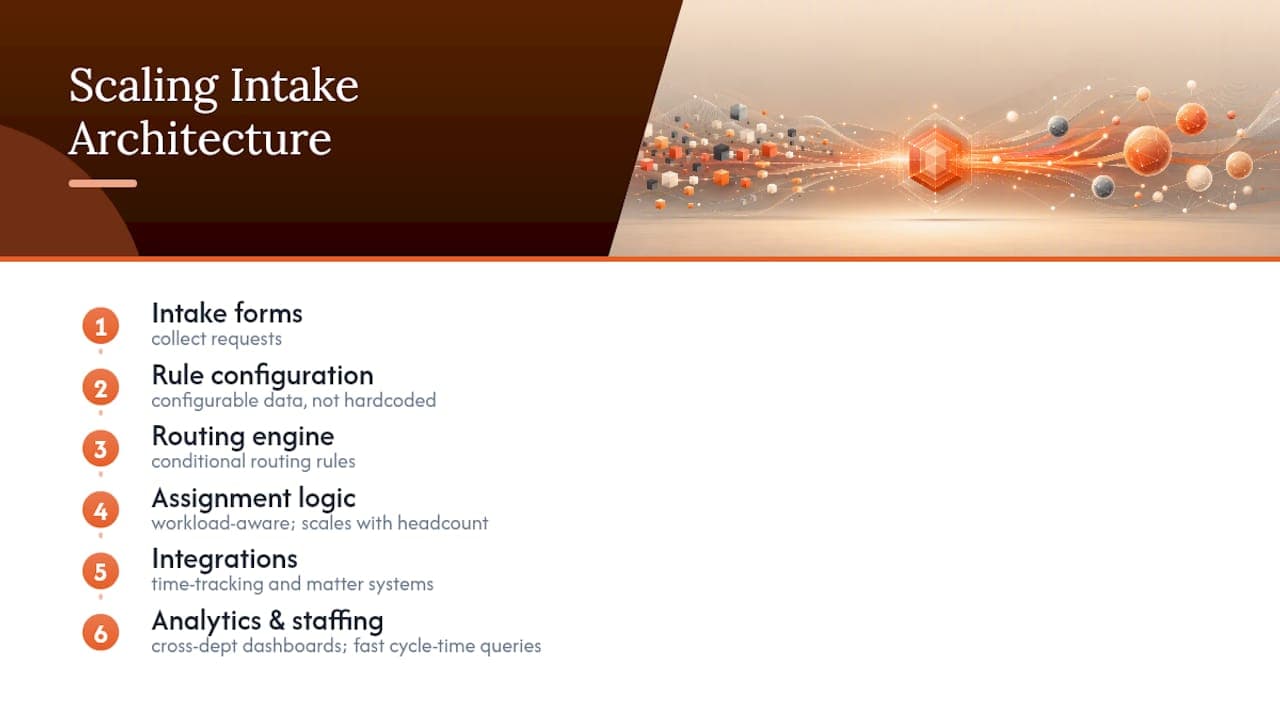
Staffing and capacity planning should factor into this from the start. Legal ops teams project future workload against broader administrative and operational staffing trends to justify headcount requests tied to intake volume growth, rather than reacting after backlogs form.
Analytics infrastructure matters here too. A dashboard that works for one department’s request volume needs to aggregate cleanly across a dozen departments without manual report-building each time leadership asks for numbers. If your current intake tool can’t answer “show me cycle time by business unit for the last quarter” in under a minute, that’s a scalability gap worth flagging before growth makes it worse.
What Intelligent Intake Costs, and What It Returns
Cost breaks into three buckets: platform or build cost, integration work, and ongoing maintenance. A no-code intake platform with standard integrations costs less upfront than a fully custom build, but custom builds tend to fit non-standard workflows more precisely, the tradeoff is speed versus fit, not cheap versus expensive.

Integration work is usually the hidden cost teams underestimate. Connecting intake to an existing CLM, matter management system, and billing platform takes real engineering or consulting hours, especially when those systems weren’t designed to talk to each other. Budget for this explicitly rather than assuming it’s included in a platform’s sticker price.
The ROI case rests on time saved, not just tooling elegance. If your team currently spends hours per week manually re-keying intake data into matter records, that time recovers almost immediately once automated pre-population works reliably. Faster time-to-assignment also reduces the soft cost of delayed legal review, business units waiting on legal move slower, and that delay has a cost even when nobody’s tracking it directly.
The realistic expectation is a phased return: quick wins in the pilot (reduced manual handoffs, faster acknowledgement) followed by a longer curve toward the bigger strategic payoff, better capacity planning and a defensible headcount narrative built on real data instead of anecdotes. Teams that expect instant transformation from a single tool purchase are usually the ones disappointed six months in; teams that budget for integration work and a phased rollout tend to see the numbers move steadily instead.
Where Rollouts Usually Go Wrong
Three mistakes show up repeatedly: automating too many request types before the pilot proves itself, skipping the conflicts gate to move faster, and treating governance as something to add later. Each one looks like a shortcut and turns into a cleanup project. The corrective action is boring but effective: keep the pilot narrow, gate conflicts from day one, and document decisions as you go instead of reconstructing them after the fact.
If You Need a Partner to Build This Right the First Time
Some legal ops teams have the engineering bandwidth to build intelligent intake in-house. Most don’t, and that’s where a focused consultancy engagement earns its cost back fast. Arosplatforms designs and builds custom AI workflow systems, including matter intake, that connect directly to your existing CLM, matter management, and billing tools rather than forcing you onto a rigid platform you don’t fully own. Engagements typically start with discovery and a scoped pilot, move through workflow design and integration, and end with handover and training, so your team runs the system afterward without depending on Arosplatforms for every change. Clients working with Arosplatforms across industries report meaningfully faster turnaround on the manual tasks intelligent workflows replace. If your legal team is ready to scope a pilot, Arosplatforms’ US consulting page is the place to start that conversation.
Sources
FAQ
What is an intelligent workflow?
An intelligent workflow is a process where AI makes decisions, like classification, prioritization, or routing, rather than simply moving a task from one automated step to the next.
What are the four types of workflows?
Legal operations generally distinguish sequential, parallel, conditional, and ad hoc workflows; matter intake typically combines conditional logic (branching based on request type) with sequential stages like capture, triage, and routing.
What are some examples of AI workflows in legal intake?
Examples include NLP classification that tags a request’s category automatically, entity extraction that pre-populates matter fields from uploaded documents, and priority scoring that recommends an assignee based on workload and urgency.
How is matter intake different from triage?
Intake captures the request and its details; triage assesses urgency, complexity, and impact to decide how the matter gets staffed and prioritized. They’re sequential stages in the same workflow, not interchangeable terms.
Should we build intelligent intake ourselves or hire help?
Build in-house if you have engineering capacity and standard request types; hire a consultancy like Arosplatforms if your workflows are non-standard or data sensitivity is high enough to warrant dedicated design and integration work.