Stop Choosing on Feature Lists: 5 Tests for Okta vs Azure AD
Stop Choosing on Feature Lists: 5 Tests for Okta vs Azure AD
If your organization runs on Microsoft 365 and manages mostly Windows endpoints, Microsoft Entra ID (the platform formerly called Azure AD) usually wins on cost and native integration. If you run a mixed SaaS estate with dozens of non-Microsoft apps, Okta usually wins on breadth of pre-built connectors and lifecycle automation. Many large enterprises run both, federating Entra ID for Microsoft resources with Okta as the front door for everything else. The real decision comes down to five things: app catalog depth, conditional access signals, hybrid Active Directory sync, provisioning automation, and how your existing Microsoft licensing already pays for identity features.
TL;DR:
- Okta excels in environments with diverse SaaS applications needing a broad connector catalog and flexible custom authentication flows.
- Microsoft Entra ID offers tighter integration and cost advantages for organizations already paying for Microsoft 365, especially with hybrid Active Directory setups.
- Testing real application connectors, provisioning cycles, and conditional access policies is crucial during PoC phases to uncover hidden costs.
- Support quality depends on existing support contracts, with Entra ID often bundled into Microsoft support plans, while Okta support varies by tier.
- Migration between platforms is complex, requiring careful planning, attribute mapping, and phased cutovers, especially in hybrid or multi-forest environments.
Table of Contents
- Okta vs Azure AD: Head-to-Head Comparison
- How Okta and Azure AD Actually Differ in Daily Operations
- How to Build Your Identity Platform Shortlist
- Support Options and Vendor Support Quality
- Migration and Data Portability Between Platforms
- Customization, APIs, and Developer Tools
- Vendor Lock-In Risk and Where Each Platform Is Headed
- User Experience Differences That Actually Matter
- Getting Expert Help With Identity Platform Deployment
- Sources
- FAQ
Okta vs Azure AD: Head-to-Head Comparison
Six platforms show up whenever this comparison gets discussed seriously: Okta, Microsoft Entra ID, Azure AD B2C (now branded Entra External ID), Auth0, JumpCloud, and the identity services bundled into Google Workspace. Each solves a slightly different problem, and lumping them together is how procurement teams end up buying the wrong tool.
The table below reflects vendor documentation and third-party comparison data, including G2’s aggregated reviewer comparison and Protego’s feature breakdown.
| Dimension | Okta | Microsoft Entra ID | Azure AD B2C | Auth0 | JumpCloud | Google Workspace |
|---|---|---|---|---|---|---|
| SSO integrations / app catalog | a very large number of connectors | a similarly large gallery of apps | Custom CIAM flows, not a catalog play | Extensive SDKs, developer-built | Moderate catalog, directory-centric | Native Google app suite, limited third-party |
| Provisioning & lifecycle (SCIM/HR) | Strong SCIM support, mature HR connectors | Solid SCIM, deep Workday/SAP connectors via Entra | Not applicable (consumer identity) | Custom via Auth0 Actions/APIs | Built-in for device and user lifecycle | Basic provisioning, Google-centric |
| MFA / adaptive auth / conditional access | Adaptive MFA, contextual policies | Conditional Access tied to Microsoft signals | Custom MFA flows for consumers | Custom rules via rules engine/Actions | Basic conditional policies | Context-aware access, Google ecosystem only |
| Hybrid AD sync / on-prem integration | AD agent, requires more setup for parity | Native via Azure AD Connect | Not applicable | Not applicable | LDAP/AD bridging, lighter footprint | Limited, mostly cloud-only |
| Device management / MDM signals | Integrates third-party MDM, added config | Native with Intune, highest signal fidelity | Not applicable | Not applicable | Built-in device management | Native for Chrome OS/Android, limited elsewhere |
| CIAM / B2C support | Via Auth0 acquisition | Via Azure AD B2C / External ID | Purpose-built for this | Purpose-built, highly extensible | Not a CIAM product | Not a CIAM product |
| Admin UX / operational complexity | Clean UI, steep policy learning curve | Familiar to Microsoft admins, dense menus | Developer-oriented console | Developer console, less admin-friendly | Simple, lightweight for smaller IT teams | Simple, embedded in Workspace admin |
| Licensing / pricing posture | Separate per-user IdP spend | Often included in M365 E3/E5 tiers | Consumption-based, pay per authentication | Tiered by monthly active users | Per-user, bundles device management | Included in Workspace tiers |
Okta fits organizations running a genuinely heterogeneous SaaS estate, where the priority is one neutral identity layer across dozens of unrelated vendors rather than deep ties to any single ecosystem.
Microsoft Entra ID fits Microsoft-centric shops already paying for M365 E3 or E5, where Conditional Access, Intune device signals, and Azure AD Connect hybrid sync come close to a built-in identity layer rather than a separate purchase.
Azure AD B2C (Entra External ID) fits companies already inside the Microsoft ecosystem that need to authenticate external customers or partners, not employees, at enterprise scale.
Auth0 fits developer-led teams building custom-facing login experiences where flexibility in the authentication flow matters more than out-of-the-box admin tooling.
JumpCloud fits smaller or mid-sized organizations that want a single cloud directory covering both user identity and device management without committing to either the Microsoft or Okta ecosystem.
Google Workspace identity services fit organizations that have standardized on Google’s productivity suite and need basic access control without a dedicated IdP layer.
The federation pattern worth understanding here: many enterprises make Entra ID authoritative for Microsoft resources (Exchange, SharePoint, Teams) while routing everything else through Okta, with the two systems federated so users get a single sign-on experience regardless of which app they’re opening.
How Okta and Azure AD Actually Differ in Daily Operations
Feature lists tell you what’s possible. Operational reality tells you what it costs to get there. Here’s where the two platforms diverge once you’re past the sales deck.
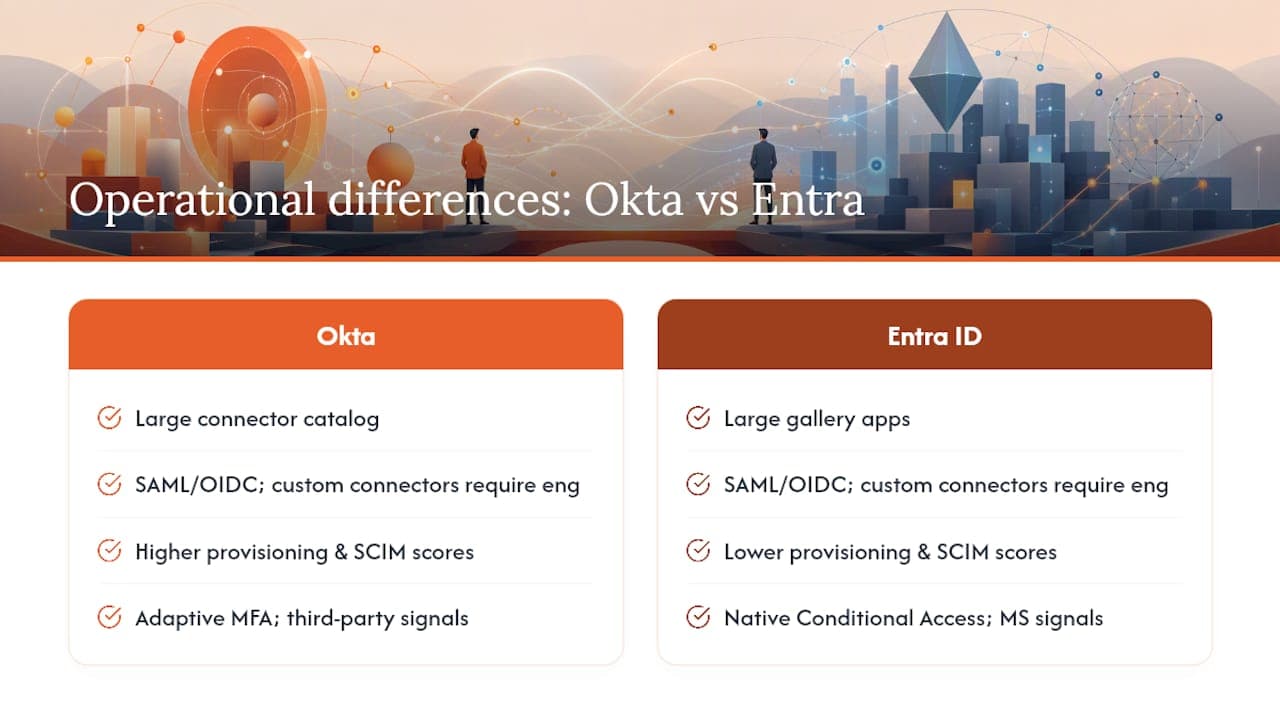
SSO and integrations. Okta’s catalog advantage (a very large number of connectors against Entra’s similarly large gallery apps, per Protego’s comparison) matters most when your app portfolio skews toward smaller, niche SaaS vendors that Microsoft hasn’t prioritized for its gallery. For anything not pre-built, both platforms support SAML and OIDC, but building and maintaining a custom connector is real engineering work regardless of vendor.
Provisioning and lifecycle. G2’s reviewer data shows Okta scoring higher on smart provisioning and SCIM reliability. The common failure mode in both platforms isn’t the SCIM protocol itself, it’s mismatched attribute schemas between your HR system and the identity provider, which silently breaks deprovisioning long before anyone notices a departed employee still has app access.
Conditional access and MFA. Entra ID’s Conditional Access engine draws on Microsoft’s own signal sources, meaning device compliance from Intune, sign-in risk from Microsoft’s threat intelligence, and location data all feed the same policy engine natively. Okta’s adaptive MFA is comparably granular but pulls device and risk signals from third-party integrations, which works well but takes more configuration to reach parity.
Hybrid AD sync. This is where Entra ID has a structural edge for Windows-heavy environments. Azure AD Connect handles complex multi-forest topologies and supports pass-through authentication without needing password hash sync, according to Protego’s analysis. Okta’s AD agent can achieve similar outcomes, but multi-forest setups typically demand more engineering time and careful high-availability planning to avoid a single point of failure.
Device trust and Zero Trust signals. Intune paired with Entra ID delivers the highest-fidelity device compliance signal available today, simply because both are built by the same vendor to share data natively. Okta integrating third-party MDM platforms can reach similar control, but expect additional testing across different device operating systems before you trust the signal in a production policy.
CIAM decisions. If you’re authenticating customers rather than employees, pick based on developer workflow, not brand loyalty. Auth0 offers deeper extensibility for custom login flows; Azure AD B2C fits better if your backend is already Azure-native end to end.
Pro Tip: Before comparing feature lists, pull your five hardest-to-integrate applications and test SSO against each platform’s actual connector, not the marketing page. That’s where the real cost difference shows up.
How to Build Your Identity Platform Shortlist
Match your environment to a starting shortlist before you burn weeks on demos:
- Microsoft-first environment (heavy M365, Intune, Windows endpoints): Start with Entra ID. Confirm which features are already included in your existing E3 or E5 license before evaluating anything else.
- Heterogeneous SaaS estate (many unrelated vendors, no dominant platform): Start with Okta. Prioritize testing the connectors for your least-common applications first.
- Consumer-facing authentication at scale: Shortlist Auth0 or Azure AD B2C based on which cloud your application backend already runs on.
- Small IT team needing directory plus device management in one tool: Evaluate JumpCloud before assuming you need a full enterprise IdP.
Run a proof of concept before signing anything. The highest-value PoC tests, according to Protego’s evaluation framework, are: SSO against your two hardest applications, a full SCIM provisioning cycle against your actual HR system, and two Conditional Access scenarios including one from an unmanaged device. A four to eight week window is typically enough to surface the real gaps between vendor claims and production behavior.
License modeling deserves its own line item. Many organizations already have meaningful Entra ID capability bundled into their M365 tier, and buying a separate identity provider on top of that without calculating the marginal cost is a common budgeting mistake. Before comparing sticker prices, get finance to confirm exactly which Entra features your current licensing already covers.
Questions worth asking every vendor during evaluation:
- What happens to provisioning if our HR system’s API changes its schema?
- How does Conditional Access behave for a user without a managed device?
- What’s the real cost of custom connector development for our top three unsupported apps?
- How does failover work in a multi-region or multi-forest topology?
- What’s included in our current license tier versus what requires an upgrade?
How This Comparison Was Built
This comparison draws on vendor documentation, Microsoft’s own Entra ID product pages, G2’s aggregated user ratings, and third-party technical breakdowns including Protego’s head-to-head analysis. Feature counts and licensing bundles shift often, so treat every number here as a snapshot to verify during your own PoC.
- Test end-to-end SSO against your actual hardest application, not a demo app.
- Run a full provisioning cycle against your real HR system, including a deprovisioning event.
- Test a Conditional Access scenario from an unmanaged, non-compliant device.
Support Options and Vendor Support Quality
Okta offers tiered support plans, with premium tiers adding faster response SLAs and a named technical account manager, a structure that mirrors most enterprise SaaS vendors. Entra ID support is generally bundled into your existing Microsoft support agreement, which means the quality you get often depends on what tier of Microsoft Unified Support your organization already pays for rather than an identity-specific contract.
This distinction matters more than it looks. If your organization already has a strong Microsoft support relationship, escalating an Entra ID issue rides on infrastructure you’ve already built. If you’re on Okta without a dedicated support tier, response times on complex hybrid AD sync issues can lag, since Okta’s own support has less visibility into your on-premises Active Directory topology than Microsoft does into its own connector.
Auth0’s support, now folded partly into Okta’s structure post-acquisition, still leans heavily on community forums and documentation for lower support tiers, which suits developer teams comfortable self-serving but frustrates IT teams expecting a phone line. JumpCloud and Google Workspace both offer more straightforward, flatter support structures that fit smaller IT teams without dedicated identity specialists on staff.
The practical takeaway: don’t evaluate support in the abstract. Ask each vendor for their SLA on a Severity 1 hybrid sync failure specifically, not their general support marketing page.
Migration and Data Portability Between Platforms
Moving identity data between platforms is rarely a clean export and import. User attributes, group memberships, and application assignments all need mapping, and neither Okta nor Entra ID uses identical schemas for these objects.
Entra ID migrations from on-premises Active Directory benefit from Microsoft’s own tooling, since Azure AD Connect was built specifically for that sync path. Migrating away from Entra ID toward Okta, or the reverse, requires more manual attribute mapping because there’s no first-party tool designed to move data between competing vendors.
SCIM helps standardize provisioning going forward, but historical data, custom attributes, and legacy group structures often need a manual audit before migration. The multi-forest and pass-through authentication topologies mentioned earlier complicate this further. A complex hybrid AD environment that took years to build doesn’t migrate cleanly in a weekend cutover regardless of which direction you’re moving.
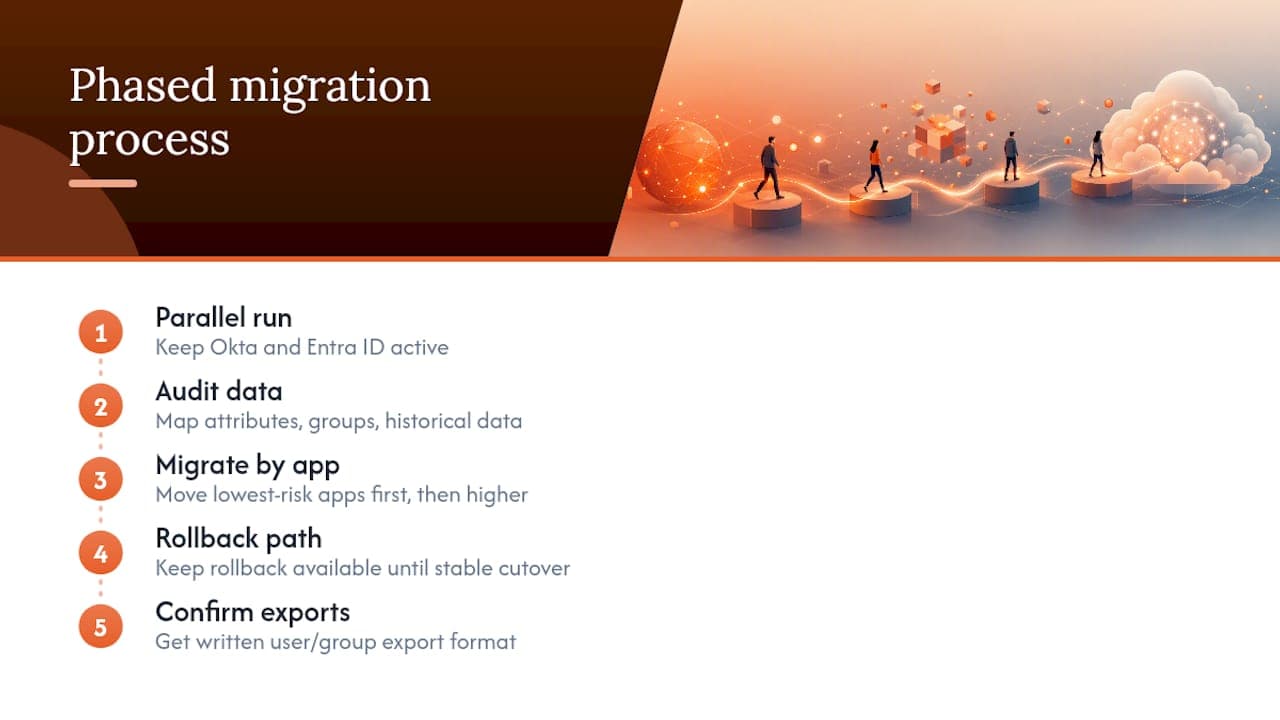
Plan for a phased cutover rather than a single switch date. Run both identity providers in parallel during a transition window, migrate application by application starting with the lowest-risk apps, and keep a rollback path available until the final cutover is confirmed stable. Data portability contracts also matter here. Before signing with either vendor, confirm in writing what format your user and group data exports in if you ever need to leave, since this detail rarely gets discussed until it’s urgent.
Customization, APIs, and Developer Tools
Auth0 remains the strongest option here by design intent. Its rules engine (now called Actions) lets developers inject custom logic directly into the authentication flow, which is why development teams building consumer-facing login experiences gravitate toward it over workforce-focused platforms.
Okta’s API is broad and well-documented, covering user management, application assignment, and policy configuration, but it’s built primarily for workforce identity administration rather than embedding custom logic into the login flow itself. Entra ID’s Graph API offers similarly wide coverage and integrates naturally if your development team already works inside the Microsoft development stack using tools like Visual Studio and Azure DevOps.
Azure AD B2C (Entra External ID) supports custom policies through its Identity Experience Framework, which is powerful but has a genuinely steep learning curve. Teams without dedicated identity engineering resources often underestimate the ramp time here.
JumpCloud’s API coverage is lighter, reflecting its focus on directory and device management rather than deep custom authentication flows. Google Workspace offers limited extensibility outside its own ecosystem, which is fine if you’re not trying to build anything custom, but a real constraint if you are.
The practical filter: if your team has developers who will actively build against the identity API, weight Auth0 or Entra ID’s Graph API heavily. If your team wants an admin console and minimal custom code, Okta’s or JumpCloud’s more workforce-oriented tooling reduces the engineering burden.
Vendor Lock-In Risk and Where Each Platform Is Headed
Every identity platform creates some degree of lock-in once your applications, policies, and provisioning workflows are built around its specific configuration model. The question isn’t whether lock-in exists, it’s how expensive it becomes to unwind.
Entra ID lock-in deepens the more Microsoft-native tooling you adopt alongside it. Once Conditional Access policies reference Intune compliance states, and provisioning pulls from Azure AD Connect synced attributes, untangling that from a broader Microsoft 365 commitment gets complicated fast. That’s a real cost, but for organizations already fully committed to Microsoft’s ecosystem, it’s a cost you’re likely paying anyway.
Okta’s lock-in shows up differently: less tied to any single cloud vendor, but the investment in custom connectors, provisioning workflows, and policy logic built specifically for Okta’s configuration model still isn’t trivially portable to a competitor.
On roadmap direction, Microsoft’s continued to rename and consolidation under the Entra ID brand, completed in 2023, signals ongoing investment in unifying identity, device management, and security signals under one umbrella. Okta’s acquisition of Auth0 signals a similar consolidation play, aiming to own both workforce and customer identity under one vendor. Neither company shows signs of slowing investment, so betting against either platform’s continued development isn’t a strong argument for switching.
User Experience Differences That Actually Matter
End users rarely care about connector counts or SCIM schemas. They care about how many times they get asked to log in and whether the login screen looks trustworthy.
Okta’s login experience is generally regarded as clean and consistent across devices, with its Okta Verify app handling MFA push notifications reliably. Entra ID’s experience feels more native for users already deep in the Microsoft ecosystem, since single sign-on across Outlook, Teams, and SharePoint happens almost invisibly once configured correctly.
Where users notice friction is inconsistent MFA prompting, being asked to re-authenticate more often than expected because Conditional Access policies weren’t tuned for their specific device and location pattern. This is a configuration problem more than a platform limitation, but it shows up more often in organizations trying to bolt Okta onto a Windows-heavy environment, or trying to layer Entra ID’s Conditional Access on top of a mixed-device fleet it wasn’t built to read cleanly.
For consumer-facing applications through Auth0 or Azure AD B2C, user experience is almost entirely in the hands of the development team, since both platforms are built to let you skin the login flow to match your product rather than presenting a vendor’s default screen.
When to Bring in Outside Help
Operating-model fit decides most identity platform outcomes, more than any single feature on a comparison table. Where things get genuinely hard is complex multi-forest Active Directory topologies, phased migrations that can’t tolerate user disruption, or Conditional Access policies that need to reconcile signals from multiple device management systems at once. That’s when bringing in a specialist earns its cost, not for picking between Okta and Entra ID, but for scoping the discovery, running the PoC, piloting with a small user group, and governing the cutover without breaking access for people mid-project.
— arosplatforms team
Getting Expert Help With Identity Platform Deployment
Choosing between Okta and Entra ID is the easy part. Executing a hybrid AD migration without breaking access for three thousand employees mid-project is where most identity initiatives actually stall. Specialist consultancies work alongside IT teams on the parts vendors don’t sell: scoping the PoC, modeling license economics before committing to a platform, and handling the deployment work once you’ve decided.
That’s a different kind of engagement than buying seats from an IdP vendor. Arosplatforms runs a readiness assessment to map your current environment against the platform you’re evaluating, then supports platform deployment and governance and compliance planning so the cutover doesn’t become a fire drill three months later. If your identity project involves more than a straightforward single-forest migration, start with a scoping conversation before you lock in a vendor contract.
Sources
- Microsoft Entra ID (Formerly Azure AD) | Microsoft Security
- Compare Microsoft Entra ID and Okta | G2
- Okta vs Microsoft Entra ID: Identity Provider comparison | Protego
FAQ
Is Okta a Replacement for Active Directory?
No. Okta is an identity provider that sits on top of or alongside your directory, it doesn’t replace on-premises Active Directory itself. Most organizations keep AD as the source of truth for on-premises resources and sync it to Okta or Entra ID for cloud application access.
Who Is Okta’s Biggest Competitor?
Microsoft Entra ID is Okta’s primary competitor in workforce identity, largely because it comes bundled with M365 licensing many organizations already own. G2’s reviewer data shows Okta scoring higher on provisioning and integrations, while Entra ID scores higher on price and value for Microsoft-centric organizations.
Is Azure AD Still a Thing?
The Azure AD name was retired. Microsoft renamed it to Microsoft Entra ID in 2023, but the underlying service, its Free, P1, and P2 tiers, and its APIs all continued functioning without disruption under the new name.
Is Okta Hosted on AWS or Azure?
Okta operates its own multi-tenant cloud infrastructure rather than running as a customer-facing product on top of a single public cloud vendor’s identity stack. This is a separate question from which cloud your own applications run on, which doesn’t affect how Okta integrates with them.
Does Arosplatforms Help With Identity Platform Migrations?
Arosplatforms supports the scoping, deployment, and governance side of identity projects, including readiness assessments and platform deployment for complex hybrid environments. Current service details and pricing are available on the Arosplatforms services page.
Recommended
Related: custom AI development.