Logistics Document Automation Guide for Operations Teams
Logistics Document Automation Guide for Operations Teams

Logistics document automation is the process of using AI-driven technology to extract, verify, and route data from shipment, billing, and compliance documents automatically, eliminating manual data entry across your operation. The industry standard term for this practice is Intelligent Document Processing (IDP), and it applies to high-volume documents like bills of lading, Proof of Delivery (POD), freight invoices, and packing lists. Manual processing consumes 15–20 minutes per document in staff time alone. That figure compounds fast when you factor in the errors that filter into billing and inventory downstream. This logistics document automation guide covers which documents to prioritize, which technology to use, and how to implement a workflow that delivers measurable ROI within 60–90 days.
Which logistics documents should you automate first?
Prioritization is the first decision that determines whether your automation project succeeds or stalls. Not every document type delivers equal return. The right starting point is the document with the highest volume, the most direct billing impact, and the most consistent structure.
POD and freight invoices are the most efficient documents to automate first. They drive measurable ROI within 60–90 days because errors in these documents directly delay payment and inflate exception handling costs. Bills of lading rank next because they carry regulatory weight under NMFTA (National Motor Freight Traffic Association) standards and feed multiple downstream systems simultaneously.
Use these criteria to rank your document types:
- Volume: Documents processed more than 500 times per month deliver faster payback.
- Billing impact: Any document that gates an invoice or triggers a payment dispute belongs at the top.
- Structural consistency: Documents with predictable field placement automate more reliably at first.
- Downstream reach: Documents that feed your TMS or ERP systems multiply the value of automation.
- Error frequency: High error rates signal high corrective labor costs waiting to be recovered.
| Document type | Typical monthly volume | Billing impact | Automation priority |
|---|---|---|---|
| Proof of Delivery (POD) | Very high | Direct | First |
| Freight invoice | High | Direct | First |
| Bill of lading | High | Indirect | Second |
| Packing list | Medium | Low | Third |
| Customs declaration | Low to medium | Regulatory | Fourth |
Start with POD and freight invoices. Use the savings from that pilot to fund the next phase.
What tools and technology does document automation require?
The technology stack for automating logistics documents has two distinct tiers, and choosing the wrong one for your document types is the most common early mistake.

Traditional OCR (Optical Character Recognition) reads text from fixed positions on a page. It works when every document from every carrier looks identical. In logistics, that almost never happens. AI contextual extraction identifies key fields regardless of layout, font, or scan quality. That distinction matters because a single carrier change can break a template-based OCR system entirely.
Intelligent Document Processing combines OCR with machine learning and natural language understanding. It classifies documents, extracts fields, validates data against business rules, and flags exceptions for human review. This is the category most logistics operations should target.
| Technology category | How it works | Best for | Limitation |
|---|---|---|---|
| Template-based OCR | Reads fixed field positions | Highly standardized forms | Breaks with layout changes |
| AI-powered extraction | Contextual field recognition | Multi-carrier, variable formats | Requires clean training data |
| Intelligent Document Processing | Classification + extraction + validation | End-to-end logistics workflows | Higher setup investment |
Your system also needs batch ingestion (the ability to process documents in bulk), schema definition (a map of which fields to extract from each document type), and validation rules tied to your business logic. Accepted formats should include PDFs, scanned images, and mobile photos from drivers.
Pro Tip: Before you configure any extraction rules, collect 50–100 real document samples from your top five carriers. Variation in those samples will reveal edge cases before they become production failures.
Modern AI platforms pre-trained on logistics documents let you upload sample documents immediately to evaluate extraction accuracy. You do not need months of training data to start testing.
How to implement logistics document automation step by step
A clear implementation sequence prevents the two most common failures: going live too broadly too fast, and spending months configuring a system before seeing any results.
1. Define your pilot scope. Select one document type, POD is the standard starting point, and one carrier or lane. Narrow scope means faster feedback and lower risk.
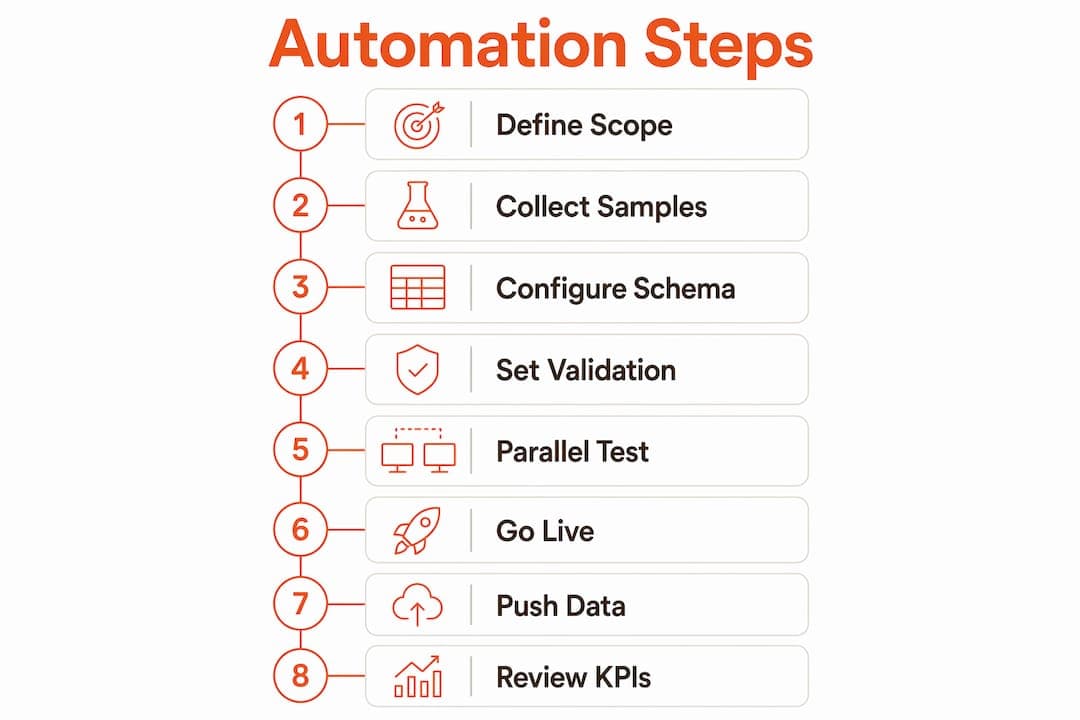
2. Collect and clean your document samples. Gather at least 50 real documents from your chosen scope. Remove duplicates and flag any documents with missing fields. Low data maturity is the leading failure point for logistics AI projects. Clean samples before you configure anything.
3. Configure your extraction schema. Define every field the system must capture: shipment ID, delivery date, recipient signature, carrier name, and any fields that feed your TMS or ERP. Map each extracted field to its destination in your downstream system.
4. Set validation rules. Build rules that check extracted data against known values. Examples include confirming that a delivery date falls within the shipment window, or that a freight charge matches the contracted rate. Keep rules specific and testable.
5. Run a parallel test. Process the same documents manually and through the automated system simultaneously. Compare outputs. Measure field-level accuracy and flag any systematic errors before going live.
6. Go live and monitor exceptions. Launch with a human review queue for low-confidence extractions. Track the exception rate daily for the first two weeks. A well-configured system should push exceptions below 5% of total volume within 30 days.
7. Push structured data to your TMS or ERP. Automate the handoff so extracted, validated data flows directly into your operational systems without manual re-entry. This is where the time savings become visible on your P&L.
8. Review KPIs and expand. Measure processing time per document, exception rate, and error rate at the 30-day and 60-day marks. Use those numbers to justify and fund the next document type.
Pro Tip: Treat your first pilot as a funding mechanism. A self-funding POD pilot can deliver ROI in 60–90 days. Use those savings to automate freight invoices next, then bills of lading, without requiring a large upfront budget approval.
Common challenges when automating logistics documents
Even well-planned automation deployments hit friction. Knowing the failure modes in advance lets you resolve them before they stall the project.
- Layout variation across carriers: A field that appears in the top-right corner on one carrier’s POD may appear at the bottom-left on another’s. AI extraction handles this better than template OCR, but you still need representative samples from every carrier in your pilot scope.
- Poor scan quality from field drivers: Mobile photos taken in low light or at an angle degrade extraction accuracy. Set minimum image quality standards and train drivers on capture technique before go-live.
- Incomplete validation rules: Validation rules that are too broad pass bad data. Rules that are too strict flood your exception queue. Start with five to ten high-confidence rules and expand based on what your exception queue reveals.
- Data maturity gaps: Many AI automation attempts stall without strong structured data feeds for 3–6 months. If your master data (carrier codes, rate tables, shipment IDs) is inconsistent, fix that first.
- Exception queue neglect: An unmanaged exception queue becomes a backlog that erases your time savings. Assign a dedicated reviewer for the first 60 days and track resolution time as a KPI.
- Scope creep: Adding new document types before the pilot is stable dilutes focus and introduces new failure modes. Finish one phase before starting the next.
The real cost of manual document handling is not just the 15–20 minutes per document. It is the error propagation that cascades into billing disputes, inventory mismatches, and corrective labor. Automation removes that cascade at the source.
Key takeaways
Effective logistics document automation starts with POD and freight invoices, uses AI-powered extraction over template OCR, and scales through self-funding pilots that deliver ROI within 60–90 days.
| Point | Details |
|---|---|
| Prioritize by billing impact | Start with POD and freight invoices; they deliver ROI in 60–90 days. |
| Choose AI extraction over OCR | AI handles layout variation and poor scan quality that breaks template-based systems. |
| Clean data before configuring | Fix master data inconsistencies before building extraction schemas or validation rules. |
| Use a parallel test before go-live | Run manual and automated processing side by side to catch systematic errors early. |
| Review KPIs every 90 days | Quarterly reviews identify new bottlenecks and justify expanding automation to new document types. |
What the Arosplatforms team has learned about scaling document automation
The most common mistake we see is treating document automation as a one-time IT project. Operations directors sign off on a deployment, the system goes live, and six months later the exception rate has crept back up because no one reviewed the validation rules after the first carrier added a new document template. Automation is a continuous improvement cycle, not a deployment checkbox.
The second pattern we see is teams rushing to add predictive analytics before their document data is clean enough to support it. AI-powered forecasting and anomaly detection require months of structured, consistent data as a foundation. Skipping that step produces unreliable outputs that erode trust in the entire system. Get your extraction accuracy above 95% and your exception rate below 5% before you layer on advanced analytics.
The third thing we have observed is that the teams who scale fastest are the ones who treat their first pilot savings as a dedicated automation budget. They do not ask for a new budget line to automate freight invoices. They use the labor hours recovered from the POD pilot to fund the next phase. That approach keeps momentum alive and removes the political friction of annual budget cycles.
One caution: do not automate every document type simultaneously. Complexity multiplies faster than your team can manage it. Pick the highest-value document, prove the model, then expand. The operations teams that try to automate everything at once almost always end up with a partially working system that nobody trusts.
— Arosplatforms team
How Arosplatforms supports your document automation program
Arosplatforms builds customized AI operating systems for logistics and shipping operations, covering everything from load planning and dispatch AI to full document extraction workflows. The approach is hands-on. The Arosplatforms team embeds within your operations to configure extraction schemas, validation rules, and TMS integrations specific to your carrier mix and document types. Clients report an average of 82% faster turnaround for key tasks, with many reaching ROI within twelve months.

If your team processes high volumes of POD, freight invoices, or bills of lading manually, AI consulting for US enterprises from Arosplatforms is a direct path to measurable reduction in processing time and error rates. No vendor lock-in. Your team owns the system.
FAQ
What is logistics document automation?
Logistics document automation is the use of AI-powered technology to extract, validate, and route data from shipment documents like POD, freight invoices, and bills of lading without manual data entry. The industry standard term for this technology category is Intelligent Document Processing (IDP).
Which documents should I automate first?
Proof of Delivery and freight invoices are the highest-priority documents because they have the greatest volume and the most direct billing impact. Automating these two types first typically delivers ROI within 60–90 days.
What is the difference between OCR and AI document extraction?
Template-based OCR reads text from fixed positions and fails when document layouts change. AI-based extraction uses contextual recognition to identify fields regardless of layout, font, or scan quality, making it far more reliable across multiple carriers.
How long does it take to implement logistics document automation?
A focused pilot on one document type can go live in four to eight weeks. Full ROI on the pilot typically appears within 60–90 days, at which point savings fund the next phase of automation.
Why do logistics AI projects fail?
Low data maturity is the leading cause. AI automation requires clean, structured master data as a foundation. Projects that skip data cleaning before configuration produce unreliable outputs and stall within the first few months.